Monthly Archives

November 2010

asterCC and asterCC-BOX released version 0.2

By | Latest News | No Comments

asterCC and asterCC-box relaased version 0.2 final asterCC-BOX

  • fixed bug of default moh disabled cause for cannot use attend transfer

asterCRM 0.072 in asterCC 0.2:

  • fixed a bug of predictive dialer when dial a ivalid number with dahdi
  • fixed a popup bug when dialed number similar on agent number
  • added parameter convert_mp3 in astercc.conf to control processmonitors if converts records to mp3
  • fixed sql error when link without queue in astercc daemon
  • added export customer data in note page
  • fixed bugs of Campaign Report
  • fixed a bug of doesnt display trunk info in portal page
  • added parameter auto_note_popup in astercrm.conf.php for if auto popup note info
  • added parameter default_share_note in astercrm.conf.php for if share note default
  • added customertitle(Mr,Miss,Ms,Mrs,other) in customer table
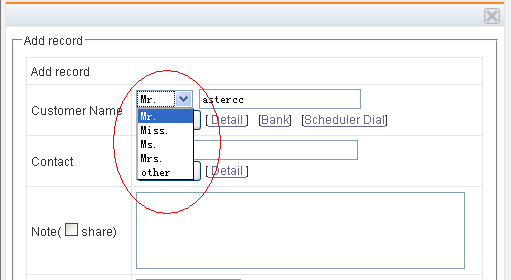
  • fixed note to blank when confirm or cannel a customer
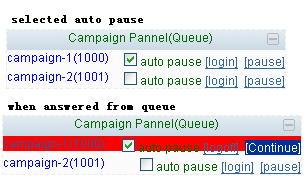
  • added auto pause on queue pannel of agent portal page
  • added parameter singleOutboundTrunk in astercc.conf

asterBilling 0.14in asterCC 0.2:

  • fixed bug of epayment with callshop_pay_fee setting
  • no longer support callback function(could use callback in version 0.12(asterCC 0.14))
  • fixed issue of astercclock cause for high CPU usage

mysql optimization for astercc

By | asterCRM | No Comments

for centos, open /etc/my.cnf [mysqld] datadir=/var/lib/mysql socket=/var/lib/mysql/mysql.sock user=mysql # Default to using old password format for compatibility with mysql 3.x # clients (those using the mysqlclient10 compatibility package). old_passwords=1 # Disabling symbolic-links is recommended to prevent assorted security risks; # to do so, uncomment this line: # symbolic-links=0 key_buffer_size = 512M max_allowed_packet = 4M thread_stack = 256K table_cache = 128K sort_buffer_size = 6M read_buffer_size = 4M join_buffer_size = 8M myisam_sort_buffer_size = 64M table_cache = 512 thread_cache_size = 64 query_cache_size = 64M tmp_table_size = 256M max_connections = 768 max_connect_errors = 10000000 wait_timeout = 10 thread_concurrency = 12 [mysqld_safe] log-error=/var/log/mysqld.log pid-file=/var/run/mysqld/mysqld.pid

How to restore astercc from backup

By | asterBilling, asterCRM | No Comments

If you bakcups the astercc database, code dirctoys and asterisk etc by backup.sh, you would get backup files as following:

./dir_backup ./dir_backup/localsave ./dir_backup/localsave/asterisk.2010-11-18-06.tar.gz ./dir_backup/localsave/astercc.2010-11-18-06.tar.gz ./backup.sh ./db_backup ./db_backup/localsave ./db_backup/localsave/astercc.2010-11-18-06.tar.gz ./db_backup/dbbk.log

All directory backup file is in dir_backup/localsave, such as above , the “./dir_backup/localsave/asterisk.2010-11-18-06.tar.gz” is backuped for asterisk etc and the “./dir_backup/localsave/astercc.2010-11-18-06.tar.gz” is backuped for astercc code. if you want restore directory, just untar .tar.gz file and move them to corresponding position. All database bakcup file is in db_backup/localsave, the “./db_backup/localsave/astercc.2010-11-18-06.tar.gz” is backup for database named astercc, if you untar the file,you would get a sql file such as astercc.2010-11-18-06.sql If you want restore database astercc, just run: mysql -uyourdbuser -pyourdbpassword astercc < astercc.2010-11-18-06.sql that’s all

How to use backup.sh to backup your databases and directorys

By | asterBilling, asterCRM | No Comments

There is a backup script in astercc scripts directory, you can use it to make a sechduled backup mission for your databases and directorys.

First you should make a directory for backup , I make it to /home/backup.

Copy the bakcup.sh and backup.conf  to /home/backup

cp astercc/scripts/backup.sh astercc/scripts/backup.conf  /home/backup

Then, configure the backup.conf:

[local] #this name of server,just for mark; default is the hostname of this server
hostname=

#local path of save the backup file, default is back script running path
localpath=

#how many latest days backup file will be saved in local server
savelocal=3

#when run bakcup shell,it will sent a mail to notify if set the mailto
#the backup notify mail to
mailto=

#the backup notify mail from
mailfrom=

if you want to send the backup file to a remote server by ftp,  just configure the [ftp] segment
[ftp] #if set, will try to sent the backup file to the host by ftp
ftphost=
ftpuser=
ftppasswd=

#directory name to save the database backup file in ftp home
ftpdbpath=

#directory name to save the dir backup file in ftp home
ftpdirpath=

[dblist] #which database would be backup you want; format: databasename:user:password
#for astercc database
astercc:astercc:asterccsecret

[dirlist] #which directory would be backup you want, the absolute path of directory and the basename of directory: /etc/asterisk:asterisk

#for asterisk etc
/etc/asterisk:asterisk

then we execute the ./backup.sh to test, after execute the backup.sh, execut “find” in /home/backup, could get likes following content:

.
./backup.conf
./dir_backup
./dir_backup/localsave
./dir_backup/localsave/asterisk.2010-11-09-05.tar.gz
./backup.sh
./db_backup
./db_backup/localsave
./db_backup/localsave/astercc.2010-11-09-05.tar.gz
./db_backup/dbbk.log

If everything is ok ,  we should set a schedule backup mission with crontab.

execute “crontab -e” and add the following line :

0 0 * * * /home/backup/backup.sh >/dev/null 2>&1

it’s means that the /home/backup/backup.sh will execute  at 00:00:00 every days, you can adjust the execute time for fit your request.

A Sonicwell Product · Also: CXMind AI · WCC Contact Center