All Posts By

solo@astercc.org

astercc 0.2 beta released

By | Latest News | 2 Comments
[download#22#size]

astercc 0.2 has great improvement than astercc 0.1x, the new features are

  • compatible with asterisk 1.6 and 1.4
    • we have done a lot of testing for both asterisk 1.6 and 1.4, and 0.2 will work for both version, in fact in this new version, we suggest customer use asterisk 1.6
  • more powerful queue realtime function

  • blind transfer attend transfer and get call back
    • when agent talk with customer, they can consult a 3rd-party and choose transfer the call or restore the original conversation
    • only asterisk 1.6 support this feature

  • same calls, less channels
    • astercc 0.X user may know that when you use click 2 dial or predictive dialer or queue, it may have more than 1 channel each call, sometime one call even take 3 channels, in astercc 0.2 we improved this, so usually one call only have one channel, this means you get more simultaneous calls for same license.
  • improvement of CDR and recording
    • now one conversation will have a main CDR and sub CDR(if it has attend transfer ), you can choose the listen the full recording or just listen part of it.
  • campaign dialedlist statistic

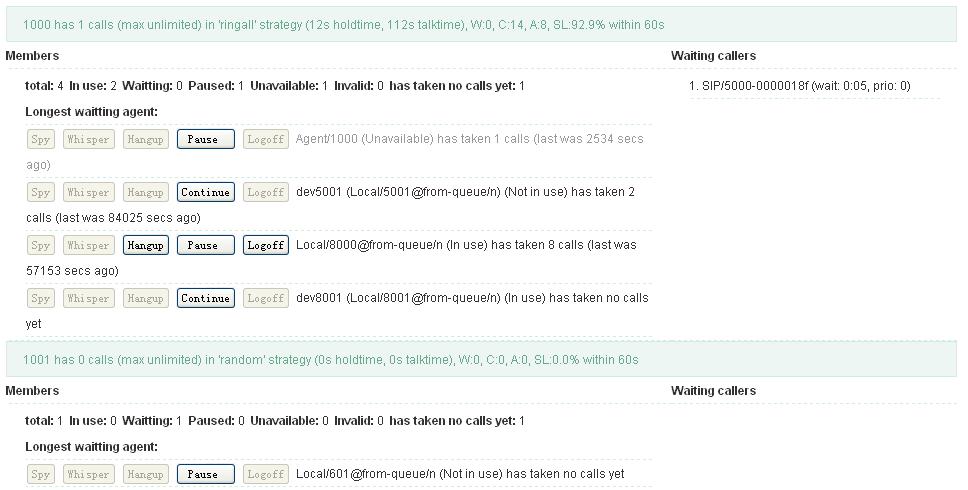
  • queue panel
    • agent can check in/check out/pause the queue, and when calls come from a queue, it will also give hint in queue panel

  • user ticket
  • scheduler call for agent
    • agent can make sheduler calls, when it’s the time, it will ring agent first, if agent answer, it will call the customer.
  • easy for customer development
    • in astercc 0.2, the CDR is more clear than 0.1X, it has no local channels so you can easily do customer developent or develop your GUI based astercc daemons
please notice that if you are using 0.1X now and want to upgrade to 0.2, your data would not lose but you may miss some data from web GUI, coz in 0.2 the CDR table changed.

asterCRM 0.07:

  • improved error debug with executed sql
  • added auto clear popup after call hangup
  • could add the number to dnc list in agent portal page
  • could set if add ‘/n’ when dial in campaign page
  • added disabed dial button when agent in call
  • added attend tranfer(with asterisk 1.6.x) in portal page
  • added check current asterisk version
  • fixed bug of import diallist
  • added memo in diallist
  • improved use post methed to popup external crm page
  • added my tickets
  • fixed bug of deleted in dnc list
  • improved processcdr.pl
  • improved processmonitors.pl
  • added billsec_leg_a ang queue number in cdr
  • added statistic in dialedlist page
  • merged the cdr and monitorrecord page
  • added loigin/logoff as dynamic agent to queue(the queue in campaign)
  • improved import page
  • improved astercrm.agi
  • added the memory table dialedlist
  • improved the predictivedialer daemon
  • improved the astercc daemon
  • added initTables(if we clear all temp data when restart astercc) in astercc.conf
  • added removeIncompleteCDR(change this to 1 if you dont want to keep cdr without dstchan) in
  • astercc.conf
  • improved queuestatus page
  • added check duplicates in diallist page

asterBilling 0.13:

  • fixed bug of update all reseller epayment information in profile page
  • added the parameter ‘callshop_pay_fee’ in asterbilling.conf and reseller profile to control if callshop pays the fee by paypal.
  • improved removePrefix in astercc.conf, supports like “removePrefix = 00,011”

set the special dialplan work with campaign callerid

By | asterCRM | No Comments

when you set a callerid for a campaign in astercrm, maybe you could find that the campaign callerid is not only show in customer’s phone , but also in agent’s phone. Now let’s fix this poplem together with asterisk dialplan.

First,we set a new dialplan such as following lines(extensions_astercc.conf is include from-internal-mask above aserCC version 0.2 beta):

[from-internal-mask]

exten => _X.,1,NoOp(${CUSCID})
exten => _X.,n,GoToIf($[“${CUSCID}” = “NONE”]?dial)
exten => _X.,n,Set(CALLERID(num)=${CUSCID})
exten => _X.,n(dial),GoTo(from-internal,${EXTEN},1)

In above dialplan we said you are using from-internal for dialout, if not you should change “from-internal” to your dialplan at last line.

And then, we should edit the ‘Incontext’ of campaign to ‘from-internal-mask’

Now, try it if work well.

Note: if you set “send calls to this queue directly” on , then the call would not go to incontext, so the solutions could not works.

Also, the cotext from-internal-mask could resleved callerid issue when click to dial in portal
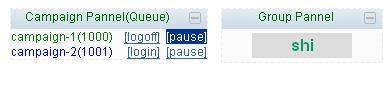
page, just need to set the outcontext to from-internal-mask in group management page:

asterCC-1.0-beta-rc1 released (commercial version)

By | Latest News | 2 Comments
    • [download#19#size]
    • [download#21#size]
    • [download#20#size]

      astercc1.0 is a contact center system, while providing a powerful CRM (customer relationship management) functions, including features we often use like inbound / outbound missile screen, call recording, interactive voice menu (IVR), call queues and so on. Basicly by using astercc, you can record every customer call, the time when the customer calls appear on the screen of the customer contact information and historical contact records, or the design of an interactive voice menu (IVR) to provide self-service inquiries. In addition, the use of reporting tools, so you can quickly call from thousands of the critical information. Finally, astercc also offers a variety of practical tools, such as the task of setting and reminders by telephone, SMS and EMAIL of enterprise information, check the map or use the google map paths.

      If you already have your own business system, you can come in its perfect integration1), for example, a customer calls you want your system to show customers information, used astercc the secondary development interface, you can quickly complete the work.

      For ISP, astercc is the best choice to carry out new business, whether functional or telephone call center switching (PBX), astercc support SAAS mode, simply building a system, we can provide services to multiple customers .

      asterCC 0.14-beta and asterCC BOX 0.14-beta-rc1 released

      By | Latest News | No Comments

      asterCC-BOX-0.14-beta-rc1 asterCRM 0.62: * added DNC(do not call list) for daillist

      dnc1

      dnc2

      * fixed worktimepackage bug with astercctools * fixed can not update callresult to dialedlist in astercrm.agi * added update groupid and accountid to mycdr(parameter “update_groupid” in astercc.conf) asterBilling 0.12: * updated astercc daemon to fixed the a billing issue, which may cause the billing sec is less than the real billing time * added playbalance.agi for listen the balance of callshop by a clid

      asterCC and asterCC-BOX released 0.14-beta

      By | Latest News | No Comments
      [download#16#size]

      asterCC-BOX-0.14-beta

      asterCRM 0.062:

      * added export in cdr page

      * added parameters(uniqueid/calldate) when ust extenal crm

      * not display diallist function when login as dynamic agent

      * added update groupid and accountid to mycdr(parameter “update_groupid” in astercc.conf)

      * improved processmonitors

      * improved export funciton, supoorts to export xls and cvs format

      * improved report page

      * astercc daemon support astersik 1.6.x

      * added script astercrm_update_cdr(update customer id to mycdr)

      * added astercrm.agi(update call result to dialedlist and Answering Machine Detect when using predictive dialer)

      * fixed worktime bug when use predictive dialer

      asterBilling 0.12:

      * improved profile page of resller and groupadmin(could view the own balance)

      * fixed the currency bug of recharge by paypal

      * added display callshop Balance in systemstatus

      * improve clid page (could control the clid if display in systemstatus as a booth)

      * improved systemstatus(could be open manager page in current page)

      * added set free call function in receipt page

      * improved receipt to close page when paid

      * improved cdr page to set special color for unbilled or free call

      * improved report(display memo and note)

      * added could set a special turnk for each resller dialout

      * astercc daemon support astersik 1.6.x

      * improved reselleroutbound.agi, support spare trunk

      * added account_log page(records the account login logs)

      Use astercrm.agi to answering machine detect and auto update call result of diledlist

      By | asterCRM | No Comments

      In astercrm 0.062,we call use astercrm.agi to answering machine detect and auto update call result of diledlist. How to: a) in your asterisk, add two context in your dialplan for reselleroutbound.agi, in directory scripts, we also provided a conf file named “extensions_astercc.conf”, [from-astercrm] and [from-astercrm-amd] is the context for astercrm.agi, if you have installed astercc via the shell script install.sh, this conf file will be copy to your asterisk etc folder, and add a new line in your extensions.conf “#include extensions_astercc.conf”, now you can use [from-astercrm] and [from-astercrm-amd] as the context for astercrm.agi, if you are using asterCC-Box, it’s configed already. If you installed astercc manually, you would like to copy extensions_astercc.conf to asterisk etc folder(usually it’s /etc/asterisk ), and add the include line in your extensions.conf (#include extensions_astercc.conf, if it’s a system based freepbx, please add this line to /etc/asterisk/extensions_custom.conf).

      extensions_astercc.conf

      b) configure campaign

      crd_amd_en

      select “Call Result Detect” and “Aswering Machine Detect”, and then fill the context for them c) try it we add some records in diallist for campaign

      dialist_en


      dialout use predictive dialer: this one , the callee refused, got the following data in dialedlist:


      dialist_en1

      dialist_en1

      and this one the callee is a fax machine, got ollowing data in dialedlist and surveyresult:

      dialist_en3dialist_en2

      config trunk and failover trunk in asterbilling

      By | Tutorials | No Comments

      in the new asterbilling, we provide a reselleroutbound.agi, so you can specific different reseller use different trunk (ex. each reseller use a account in a2billing), and you can config a failover trunk for the reseller.

      Howto::

      a) in your asterisk, add a context in your dialplan for reselleroutbound.agi, in directory scripts, we also provided a conf file named “extensions_astercc.conf”, [asterbilling- outbound] is the context for reselleroutbound.agi, if you have installed astercc via the shell script install.sh, this conf file will be moved to your asterisk etc folder, and add a new line in your extensions.conf  “#include extensions_astercc.conf”, now you can use [asterbilling-outbound] as the context for asterbilling, if you are using asterCC-Box, it’s configed already. If you installed astercc manually, you would like to copy  extensions_astercc.conf  to asterisk etc folder(usually it’s /etc/asterisk ), and add the include line in your extensions.conf (#include extensions_astercc.conf, if it’s a system based freepbx, please add this line to /etc/asterisk/extensions_custom.conf)

      extensions_astercc.conf

      extensions_astercc.conf

      b)config the trunk for reseller

      reseller_trunk1

      when clid dialout, it’ll use turnk1 first and if  dail failed, it’ll try to dial by trunk2

      There are three type of trunk: auto,default and customize

      auto:reselleroutbound.agi don’t proccess anything,and  goto next step of context

      default:your can select a default trunk that set in [resellertrunk] segment asterbilling.conf.php,  could be set tow default system trunk:

      [resellertrunk] trunk1_type = sip
      trunk1= reselleroutbound1
      trunk2_type = sip
      trunk2= reselleroutbound2

      customize:add new trunk for this reseller,should click “reload” button to generate asterisk conf file when saved trunk infomation

      reseller_trunk2en

      when you add the trunk for the first time, when you reload, if will have two conf file: sip_astercc_registrations.conf  and  sip_astercc_trunks.conf , if you are not using astercc-box, please include these files to your sip.conf(for freepbx based system, please add  #include sip_astercc_registrations.conf to /etc/asterisk/sip_registrations_custom.conf, and add #include sip_astercc_trunks.conf  to /etc/asterisk/sip_custom.conf, and then do sip reload in asterisk , for the next time you add trunk, just need click the “reload” button.

      asterCC & asterCC BOX released 0.13

      By | Latest News | No Comments
      [download#14#size]

      asterCC-BOX-0.13 download

      asterCC BOX 0.13:

      * updated to freepbx 2.6 rc2
      * updated to asternic 1.2
      * updated to asterCC 0.13

      asterCRM 0.061:

      * added agents manager in astercrm to manage agents.conf
      * fixed the bug that cant edit worktime_package
      * added callOrder field in diallist
      * added diallist panel in portal page
      * added the daemon to convert recording files to mp3 format
      * added mp3 online player
      * added agent portal panel switcher
      * added clear screen button in agent portal

      asterBilling 0.11:

      * fixed the prefix billing
      * added professional mode
      * added member mode switch
      * added Portuguese support

      astercrm_agentsettings

      astercrm agent management
      astercrm_clearscreen

      astercrm clearscreen
      astercrm_dialliatpannel

      astercrm diallist pannel
      astercrm_panelswitcher

      astercrm panels witcher
      astercrm_mp3player

      astercrm mp3player for recording files
      asterbilling_professional

      asterbilling professional mode
      asterbilling_portuguese

      asterbilling portuguese language support
      .
      freepbx2.6 in asterCC BOX 0.13

      freepbx2.6 in asterCC BOX 0.13
      asternic_realtime

      asternic_realtime
      asternic_distribution

      asternic_distribution


      tutorial: use astercrm & asterisk for broadcasting

      By | asterCRM | 6 Comments

      in this tutorial, it will guide u how to broadcast your message in asterisk and astercrm.

      1. add outbound context in asterisk

      add the following content in your dialplan (like extensions.conf)

      [for-outbound] exten => _X.,1,Dial(SIP/yourtrunk/${EXTEN},45)
      exten => _X.,n,Hangup

      exten => h,1,NoOp(${DIALSTATUS})
      exten => h,n,Hangup

      here  “yourtrunk” should be defined in your sip conf file, or you can use other trunk you have, like IAX2, ZAP, DAHD I…

      2. add inbound context in asterisk

      add the following content in your dialplan (like extensions.conf)

      [for-collection] exten => _X.,1,NoOp(${EXTEN})
      exten => _X.,Background(YOURMESSAGE)
      exten => _X.,n,Hangup

      exten => 1,1,Queue(1000); means when customer press 1 when it’s playing, he will reach your queue 1000

      exten => h,1,Hangup()

      then it will look like

      context

      3. add group in astercrm

      login astercrm as admin, then go to extension->group admin, add a group for this broadcasting project

      group

      4. add campaign in astercrm

      then go to diallist->campaign, add a campaign, in outcontext and incontext, we will put the context we added before, for-outbound and for-collection

      campaign

      5. upload the diallist

      you can upload a excel/cvs file to diallist, or you can insert record to diallist table using your script

      numbers.csv

      numbers

      import:

      import

      6. start the dialer

      then u can go to dialer page to enable the campaign,  also you can set a limitation of  the max outbound calls there

      dialer

      7. set a time limitation

      if you only want it dial at spcific time, you can add a time package for the campaign. first add some time

      diallist -> worktime

      worktime

      then create a work time package and add the worktime in

      worktime_package

      then set the campaign to use this work time package

      campaign_with_worktime

      8. check dial result

      go to diallist -> dialedlist, you can find the result

      dialedlist

      hope this post can help you create ur first broadcasting campaign, and u can also improve on this, like u can use a script to insert to diallist automaticly or set some survey so customer can press in their option when listening to your message.

      A Sonicwell Product · Also: CXMind AI · WCC Contact Center