

in the new asterbilling, we provide a reselleroutbound.agi, so you can specific different reseller use different trunk (ex. each reseller use a account in a2billing), and you can config a failover trunk for the reseller.
Howto::
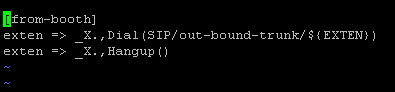
a) in your asterisk, add a context in your dialplan for reselleroutbound.agi, in directory scripts, we also provided a conf file named “extensions_astercc.conf”, [asterbilling- outbound] is the context for reselleroutbound.agi, if you have installed astercc via the shell script install.sh, this conf file will be moved to your asterisk etc folder, and add a new line in your extensions.conf “#include extensions_astercc.conf”, now you can use [asterbilling-outbound] as the context for asterbilling, if you are using asterCC-Box, it’s configed already. If you installed astercc manually, you would like to copy extensions_astercc.conf to asterisk etc folder(usually it’s /etc/asterisk ), and add the include line in your extensions.conf (#include extensions_astercc.conf, if it’s a system based freepbx, please add this line to /etc/asterisk/extensions_custom.conf)

b)config the trunk for reseller

when clid dialout, it’ll use turnk1 first and if dail failed, it’ll try to dial by trunk2
There are three type of trunk: auto,default and customize
auto:reselleroutbound.agi don’t proccess anything,and goto next step of context
default:your can select a default trunk that set in [resellertrunk] segment asterbilling.conf.php, could be set tow default system trunk:
[resellertrunk] trunk1_type = siptrunk1= reselleroutbound1
trunk2_type = sip
trunk2= reselleroutbound2
customize:add new trunk for this reseller,should click “reload” button to generate asterisk conf file when saved trunk infomation

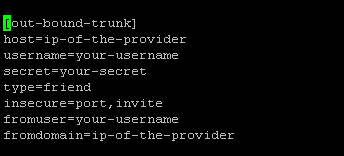
when you add the trunk for the first time, when you reload, if will have two conf file: sip_astercc_registrations.conf and sip_astercc_trunks.conf , if you are not using astercc-box, please include these files to your sip.conf(for freepbx based system, please add #include sip_astercc_registrations.conf to /etc/asterisk/sip_registrations_custom.conf, and add #include sip_astercc_trunks.conf to /etc/asterisk/sip_custom.conf, and then do sip reload in asterisk , for the next time you add trunk, just need click the “reload” button.






 9. step9, check reports