

astercc daemons are licensed by asterisk simultaneous channels, so how could we know the channel’s number of the asterisk server? outbount: 1 call, 1 channel callback: 1 call, 2 channels queue: 1 call, 2 channels but if you select the ring strategy as “Ring All”, then u may get tons of channels when a call come in. also when you goes to voicemail or login as dynamic agent, it will take one channel.
There’re some parameters in file astercc.conf for astercc daemons. We can change them to get a beter performance for asterisk billing. please note that u need to restart asterrc daemon to reload configration. refreshrate = 60 refreshrate is the seconds asterrc daemon reload data from database, when u change asterBilling setting a lot, like rate, clid … , u need this parameter, but once your system is stable, u can set it to -1, so that after asterrc load the data when it start, it would not read from database again and again. refreshlock = 30 The seconds we refresh data for astercclock to lock booth, or lock group, reseller. calculateallcdr = no when set to yes, asterrc will re-calculate all records with groupid =-1 or resellerid = -1 in mycdr table, this could be used when u want to calculate the CDRs with no billing . calculateoldcdr = no when set to yes, asterrc will re-calculate all records in mycdr table, this could be used when u want to calculate the history CDR. This could be used when your rate changed and you want to reset all credits. callbackbill = src ; src: bill src only ; dst: bill dst only ; both: both src and dst removeNonSysCDR = 0 ; if we need use asterrc to remove CDR with resellerid = -1 or groupid = -1 removeNoAnswerCDR = 0 ; if we need use asterrc to remove no answer CDR
a2billing is a widly used billing system, so what’s the difference between a2billing and asterbilling?
system theory:
a2billing work with asterisk through AGI, each call would be handled by a2billing.agi, so you need change your astierks context so that when your phone make calls it will go to a2billing.agi, of course you need to copy a2billing scripts to your asterisk server.
asterbilling runs as linux daemons, connect to asterisk via AMI over tcp, no need change anything on your asterisk, asterbilling can bill it. Even asterbilling could work with a2billing.
license & free:
a2billing: 100% open source and free to use.
asterbilling: only web scripts are open source, and provides 5 free simultaneous channels, have to purchase when need more channels.
performance:
a2billing: like 100 simultaneous calls on single server? i didnt test, 🙁
asterbilling: passed 240 simultaneous calls testing, but didnt test more.
best usage:
a2billing: calling card, callback or wholesale solutions
asterbilling: billing for embedded astiersk, pbx (like all freepbx based system), callshop, hosted callshop soltution
other keywords:
a2billing: openser
asterbilling: realtime billing, reseller
In asterCRM config file: astercrm.conf.php, it provides a option, with the option, you can set the information displayed in the agent work page.
The parameter is “portal_display_type”, there’re two valid values, “customer” and “note”
When it’s “customer” mode, it would display all customers agent putted

customer mode
When it’s “note” mode, it would display customers with “note” and priority is greater than zero

note mode
There are three rates in asterBilling, reseller rate, callshop rate and customer rate.
- reseller rate: the rate admin sell to reseller
- callshop rate (group rate): the rate reseller sell to callshop (group)
- customer rate: the rate callshop sell to customers
Rates in asterBilling could be inherited, for example, here’s two records in resellerrate

dialpreifx = 0086
number length = 0
connect charge = 0.2
init block = 60
rate = 0.2
billing block = 60
resellerid = 0
dialpreifx = 0049
number length = 0
connect charge = 0.4
init block = 60
rate = 0.4
billing block = 60
resellerid = 0
Because we dont specify which reseller is this rate for (resellerid = 0), this rate could be used for all resellers. So what if some resellers want to change this rate rather than use this “default” rate? quite simple, just add another rate for the reseller:
dialpreifx = 0086
number length = 0
connect charge = 0.2
init block = 60
rate = 0.2
billing block = 60
resellerid = 1
so for this reseller (resellerid=1), when customer dial a number begin with 0086, it will use this new rate, we can call it “overwrite”, but for other resellers who dont set their rate, it would use the one admin setted.
Just like reseller rate, group rate could also be inherited.
A:
dialpreifx = 0086
number length = 0
connect charge = 0.2
init block = 60
rate = 0.2
billing block = 60
resellerid = 1
grouprid = 1
B:

dialpreifx = 0086
number length = 0
connect charge = 0.4
init block = 60
rate = 0.4
billing block = 60
resellerid = 1
grouprid = 0
C:

dialpreifx = 0086
number length = 0
connect charge = 0.4
init block = 60
rate = 0.4
billing block = 60
resellerid = 0
groupid = 0
so rate C is a rate for all reseller and all group, rate B is for all groups in reseller 1, rate A is only for group 1.
Through inherit rate, admin could be much easier to control the rates, like just set one rate for all resellers, and adjust some when they require some difference, also reseller could just set one rate for his callshops, and only do minor change to provide different rate plan.
asterBilling is a realtime billing software for asterisk. Through asterBilling, it’s very easy to build a hosted callshop solution for asterisk. benefits of asterBilling hosted callshop solution:
- reseller, callshop, customer three level billing
- all web based
- high performance
- all asterisk system compatible
here, i’ll introduce u how to build a hosted callshop solution using asterisk and asterbilling. 1. step1, install asterisk 2. step2, set trunk and dialplan in asterisk edit /etc/asterisk/sip.conf and add your trunk there 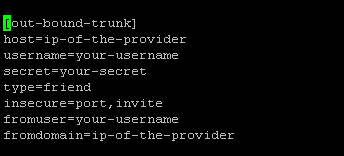 then set dialplan, go to /etc/asterisk/extensions.conf and add a context there
 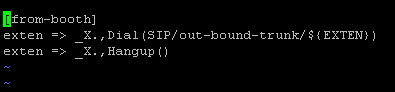 3. step3, install asterBilling 4. step4, check asterbilling.conf.php We need to modify asterbilling config file to meet our system, so check the “asterbilling.conf.php” in asterbilling folder, find section “sipbuddy” change context to be “context = from-booth”, so the sip peer generated by asterbilling will use context “from-booth” for outbound calls.
  * if you are using freepbx, you can use “context=from-internal” here, then it you can set outbound in your freepbx and all booth will use that. By default, asterbilling will generate all sip peers to the file “/etc/asterisk/sip_astercc”, you can change to other name if you want, or leave it blank if u dont want asterbilling generate the sip peers
  also we need to include the conf file in sip.conf so that asterisk could load peers asterbilling generated modify /etc/asterisk/sip.conf and add #include sip_astercc.conf
  5. step5, set resellers and groups 6. step6, add clid as reseller
  7. step7, set rates asterbilling provides three level billing: rate to reseller: the rate you sell to resellers rate to callshop: the rate resellers sell to callshops rate to customer: the rate callshops sell to customers 8. step8, login as groupadmin/operate check callshop interface
  9. step9, check reports
In asterCRM, we can set some description for a trunk or a DID, so that when customer dial in, we could know which number he dialed or which trunk he dialed from.  it’s very simple to set this, login as admin and go to management interface, select Trunkinfo, and then add the trunk or didnumber or both.
  this feature could be very useful for a virtual office, say you have some agent in the office, they answer phones for kinds of company, need to say different hello words for different company
You can import your data via web page in asterCC, in asterCRM, you can import customers, contacts and diallist, in asterBilling, you can import customerrate, grouprate and resellerrate, when import in asterCC, it will require you define how to map your data in excel/csv file to fileds in database.
say you have a rate table what to import as rate for callshop, filename is callshoprate.csv, the content is like
93,0,Afghanistan,0,1,14.5,60,1,2,15.03.08 18:22
9370,0,Afghanistan - Cellular,0,1,11,60,1,2,15.03.08 18:22
9379,0,Afghanistan - Cellular,0,1,11,60,1,2,15.03.08 18:22
35538,0,Albania - Cellular,0,1,10.5638,60,1,2,15.03.08 18:22
1. select your data file, asterCC support excel or csv format OR you can select a exsited file in your “upload” folderand then click “Upload”

then select callshoprate from the drop down menu on left

If this rate is for specific reseller/group, we can selec the reseller and group at the buttom, but here we leave is as “All”, means all groups in all reseller will use this rate by default
click “Import” to import the data, then u might get a Success prompt and see such page

if you only get 0 records from the message, go back and check if anything is wrong.
In astercrm, there’re some more options

asterCC package provides a call center solution and a billing solution for asterisk, the most important feature is, asterCC could work with all asterisk based solutions and no need do any modification to the original system, as we have tested, including:
- Trixbox
- Elastix
- Callweaver
- Freepbx
- Magiclink
- Fonesoft
- asterisk2billing (a2b)
- pbx in a flash
- …
so when you are using a asterisk based system and want to add call center or billing features, asterCC is a good choice.
asterCC solutions connect to your asterisk via AMI over tcp, so even a embedded asterisk equipment would use asterCC for billing or contact center.
asterCC works based callerid, so it doesnt care what’s the asterisk dialplan or how a agi work, as long as you have correct callerid in your asterisk, asterCC could work with it.
Working as daemon service in linux, asterCC is stable and extremely efficient, we have test that it could support at least 240 simultanieous asterisk calls.
Open source as all web scripts is, there’s also the possibility that you make your own solution based astercc daemons, and with the 5 free simultanieous channel license it provides by default, no need to pay a dollar for small business, like to bill an asterisk pbx with users less than 12.
asterBilling is a realtime billing solution for asterisk, could be used as a hosted callshop or just a simple billing system for your asterisk pbx. Many people are using freepbx based system as their pbx, like trixbox, elastix … so here i’ll introduce you how to use asterBilling to bill your asterisk pbx.
the first thing is, you must have freepbx installed and have a user their, say you want to bill these two users: solo <8000> and donnie <8001>

next go to asterBilling manager login (like https://asterccserver/asterbilling/manager_login.php) and login as “admin”

Although we only want to bill our pbx, still have to add a reseller first, go to “reseller” and click “Add” button, pur some message in the form and click “continue”

i left “Credit Lmit” to be null and “Limit Type” to “No limt” coz i just want to know how much each phone dialed each month.
then go to “Account Group” and add a group there