


a instruction about how to Integrate Your Own Web Popup with Astercrm / asterisk
a instruction about how to Integrate Your Own Web Popup with Astercrm / asterisk
Log in the system page, enter the agent interface. Find the campaign pannel(Queue ) below the campaign corresponding to the queue number, and the two options, login, pause.

After elected “login”, then the current agent has been logged into the queue which belongs to the queue number, the queue was according to the state of all the agent be logged to assign the calls. After elected “pause”, then the agent has been logged are not be assigned phone calls whether he is busy or free. When elected logoff, the current agent were logged off from the queue, the queue will not assign any phone calls to the agent.
Return to the management interface, enter the dial list below campaign find the queue number corresponding to the campaign name, click on the campaign “edit” to open.

Find queue number, indicate the agent to be logged in the queue number; Queue Context, the crew used the queue context, freePBX use the latest version is the current from-queue; Use Extension Channel For Queue, where there are two cases. One case is logged in default, do not be checked before “Use Extension Channel For Queue”, in the asterisk CLI to perform queue show.

Another case is to use” Use Extension Channel For Queue”, checked before “Use Extension Channel For Queue”, in the asterisk CLI to perform queue show.

Back to the management interface, enter the extension to find the user name of current agent, click “edit”

Channel option, sip/8003, 8003 is the current agent extension.
Log in system and enter the agent interface, if the dial list of agent interface have no data, the “start work” function is forbidden.

Dial list exists phone number, the “start work” can be used properly. The phone number in dial list can be added manually or through batch import entry. Make the dialnumber in dial list, agent can click on “start work” to call outbound.
Click the “Start work”, the system will be calling dialnumber in the dial list one by one, at the moment the window about information will pop up, such as “input customer information”, “add records” pop-up window.

When the call is connected, the agent can communicate with customers to get the information input, the upper left corner points out the system is recording. After the call, click on the “hang up”, then the system will turn into count down and dialing the next dialnumber automatically.

Agent can set time in count down optionally, go into extension in management interface, find the editor belongs to user name,click and pop up a window says “Edit Account”

Find “dial interval”, setting“0”, the system default countdown in 30 seconds, setting greater than “0”, according to the number as the seconds of countdown. There are two or more than two dialnumbers in dial list will turn up count down, only one dialnumber can not be.
Agent can also stop work at any times as condition change, then the system will no longer auto-dial the dialnumber from dial list in agent interface.

Into the system management interface, find the import function,enter.
 Choose file
Choose file to upload, you can browse the files you want, or you can choose an existing file, then upload it. After successful upload, the data you want will upload to the system, then you can select the form, specify the data into the appropriate form.

Select customer, there will be corresponding to the fields of this form.
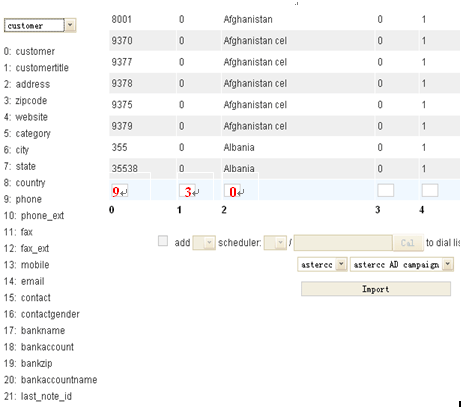
According to the data appear in front of several pieces of information, each vertical line corresponding to one information, information corresponding to the field appears to the left and the fields of the code will fill in the information at the bottom of the box.

Next, you must tick before “add” , and the data adding to the dial list at the same time, select the number corresponding to the phone, select the outbound time, if you want to be evenly distributed to agent, then you do not tick before “assign”, if you want a agent assigned to a designated, tick in front of the “assign”, and noted the number of the agent, if you want to assign two or three agent you can with “,” separated. Choose your campaign, and click Import.
Before importing, when you make the phone number that will be imported to assign to a designated agent, then after importing is completely, return to the agent interface, you will find all the phone numbers waiting to be dialed in the dial list.

If you do not want to assign these phone number to a designated agent, you do not have to tick before “assign”, return to the agent interface, you will find there is not any date in the dial list from agent interface.

then all date have been imported will be found in dial list, the system do not assign to any agent.

dial list
Then you go back to “customer” page, you will find all the data has been imported successful in your customer data sheets, and all information corresponding to each field in form. At the same time, dial list also appear to all the same data has been imported, according to the dialing time to go to dial the number.
Open login screen, enter the correct user name and password to submit into the management interface. Choose “dial list”, create a new campaign, click to campaign and then select the “Add” button. Pop-up a list box about add campaign, according to your demands to fill the information completely. 
Add Campaign
Under the toolbar you will find Campaign Result, add. 
Arrow points to the Campaign Result
Then it will pop up a window of Campaign Result  You can set up by yourself according to your own business maybe used in result name, it can be refused access, voicemail, dead number or other such results. The campaign name you can choose the campaign that you have established just now, or you may also specify the choice plan. Back to agent began to call the number from dial list, add a phone number
  Arrow points to add a phone number to dial list, fill in the information completely, continue. You can also choose to bulk import, in order to import the phone number into dial list. When the call is connecting, the screen will pop up a window for agent to record the customer information. According to call ends the agent may choose the call result setting up before corresponding to the state. Then click Update. System prompted to update successfully.
  Right now you go back to see the dialed, you will find the results of a column in the Campaign Result information displayed. Allow you clearly to see the result of customer in the form of campaign result.
  Then let we see the dailed, the system will prompted the call is answered or no answer, which results in the campaign result will be prompted to the form or how about answer and no answer. Management will consider screening out potential customers in its next outbound, object among those empty number, wrong number or do not want to keep the number of filtered out. First, we find the search option to open the drop-down list, find the campaign result, input you want to keep in the back of the results, for example, you want to keep “refuse”or “voicemail,” enter the appropriate results, and select Options – “recycle”, so that these dailed numbers will be present to dail list again.
  The numbers be recycled will present to dial list once again.
  With this method, you may also filter out the wrong number or dead number to delete. In this way, the dail list will save those numbers that you have already recycled unsuccessful once more, to make the next dial-up, to keep more potential customers.
There is a perl script named processdata.pl in astercc scripts directory, you can use it to check duuplicate or truncate for your astercc database.
First, need to configure astercc.conf about tow segment [check_duplicate] and [truncate_table], let’s go to astercc scripts dirctory(/opt/asterisk/scripts/astercc/), and edit astercc.conf
[check_duplicate] for configure paramer of checking duplicate data:Format: table = field1:field2:[field1,field2]|orderfield(default:id),order(default ASC)|condition_table:condition_display:foreign_key
for example: we want to check duplicate phonenumber in customer table and order by created time asc, just add following line :
customer = phone:mobile:phone,mobile|cretime,asc
we define three table in default astercc.conf, customer, customer_lead and diallist. just like following:
[check_duplicate] ;Format=> table = field1:field2:[field1,field2]|orderfield(default:id),order(default ASC)|condition_table:condition_display:foreign_keyand the configuration for truncate table is samlply, just add table name = 1 in [truncate_table] segment:
[truncate_table] mycdr = 1Now, let’s execute processdata.pl and follow the prompts to check dumpliate or truncate table step by step.
./processdata.pl
first step, you should select what you want to do , check duplicate or truncate, I selected check duplicate , just type “C” and press enter.

and then need to select which table you want to check, just type the number of table, I selected 1 for customer table;

next select which fields in table you want to check duplicate, I select ‘3’ for check phone and mobile .

now you should select a option from check duplicate :

the last step, it’ll list all of you selected and you need confirm to run:

press ‘Y’ to start checking

It’ll delete the duplicate and record data to a csv file.
we have improved the auto-recyle feature in new version, now you could config auto-recyle by campaign.
auto-recyle is used to recyle the number from table campaigndialedlist to diallist, so system could re-dial customer phone in some conditions, it has the following parameters:
Max trytime: the maximum time the dialer will try dial
Recyle time: it will start recyle when “Recyle time” seconds after the call is done
Enable Auto Recyle: set to “yes” if you want to enalbe auto-recyle
Min Duration: number will be recyled when the full duration is less than this value, this duration including ring time
Agent Answer Min Duration: number will be recyled when agent talking time is less than this value
Customer Answer Min Duration: number will be recyled when customer answering time is less than this value
* number will be recyled only when it meets all conditions above
the most feature in astercc is the predictive dialer, using the dialer you could improve the work efficiency. In this tutorial, I will introduce how to setup a dialer with a pre-configed IVR: when dialer start work, customers will hear a IVR which you configed in Freepbx, so we could also config in the IVR to accept customer input, and we can forward to an new IVR or agents in a queue.
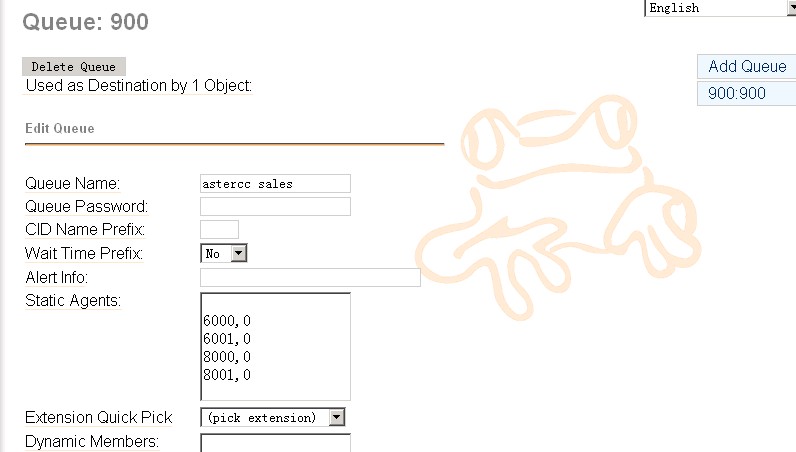
1. config a Queue in freepbx
usually you want to config a queue to resonpse customer if they want to reach some live agent, so we config a queue first
2. config an IVR in freepbx
2.1 first we will add some voice in the IVR, you’d like to use a recording software, just notice that in asterisk, it requires to use wav format and 16bit, 8000HZ mono


2.2 add a recording
you can either upload the recording you finished in your pc, or use a ext. in system to record a new one


2.3 add IVR
now queue and recording is ready, we could add the IVR

in announcement, we select the recording we just done, and also we added two options to accept customer input, when customer hits 1, he will go queue 900, and when hits 2, he will go to ext. 5001.
4. add misc
then we need add a misc so the dialer could reach the IVR
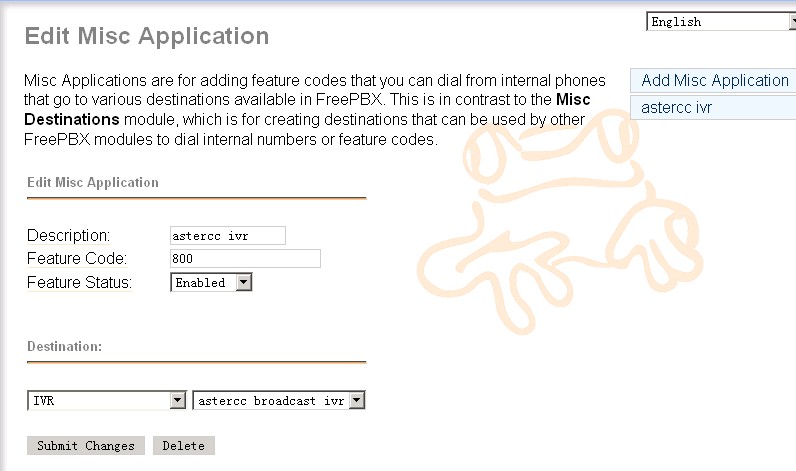
remember this feature code 800, we will use it when configing campaign in astercc, you could use some other code as you like, just make sure it’s unique in your freepbx
now we finished the job in freepbx, you’d like to dial 800 from any extension, it supposes to bring you to the IVR.
5. config the campaign in astercc
login as admin, and go to campaign, add a campaign as following

make sure in “Inexten” you put the same code as in “misc application”, and in “Queue number” put the same queue number as your freepbx queue
6. add agent user in astercrm
you’d like to add some account for your agents if you want them get a popup form when they start answer customer calls, go to “Extension” to add astercrm account for your agents, make sure the account “extension” match the ext. in your freepbx

7. start dialer and test agent
before start dialer, you’d like to check your astercc.conf
make sure this parameter is configed as
doublecheckcampaign = yes
then restart astercc daemons
/opt/asterisk/scripts/astercc/asterccd restart
ask your agent login and as admin go to dialer page, start the dialer

as an agent, he will get a popup when customer answered the call and hit 1 for queue

8. check report

you could go to dialedlist to check the campaign status
* to get a working freepbx and asterisk easily, you could choose astercc box, elastix, pbxinaflash or trixbox
for centos, open /etc/my.cnf [mysqld] datadir=/var/lib/mysql socket=/var/lib/mysql/mysql.sock user=mysql # Default to using old password format for compatibility with mysql 3.x # clients (those using the mysqlclient10 compatibility package). old_passwords=1 # Disabling symbolic-links is recommended to prevent assorted security risks; # to do so, uncomment this line: # symbolic-links=0 key_buffer_size = 512M max_allowed_packet = 4M thread_stack = 256K table_cache = 128K sort_buffer_size = 6M read_buffer_size = 4M join_buffer_size = 8M myisam_sort_buffer_size = 64M table_cache = 512 thread_cache_size = 64 query_cache_size = 64M tmp_table_size = 256M max_connections = 768 max_connect_errors = 10000000 wait_timeout = 10 thread_concurrency = 12 [mysqld_safe] log-error=/var/log/mysqld.log pid-file=/var/run/mysqld/mysqld.pid
If you bakcups the astercc database, code dirctoys and asterisk etc by backup.sh, you would get backup files as following:
./dir_backup ./dir_backup/localsave ./dir_backup/localsave/asterisk.2010-11-18-06.tar.gz ./dir_backup/localsave/astercc.2010-11-18-06.tar.gz ./backup.sh ./db_backup ./db_backup/localsave ./db_backup/localsave/astercc.2010-11-18-06.tar.gz ./db_backup/dbbk.log
All directory backup file is in dir_backup/localsave, such as above , the “./dir_backup/localsave/asterisk.2010-11-18-06.tar.gz” is backuped for asterisk etc and the “./dir_backup/localsave/astercc.2010-11-18-06.tar.gz” is backuped for astercc code. if you want restore directory, just untar .tar.gz file and move them to corresponding position. All database bakcup file is in db_backup/localsave, the “./db_backup/localsave/astercc.2010-11-18-06.tar.gz” is backup for database named astercc, if you untar the file,you would get a sql file such as astercc.2010-11-18-06.sql If you want restore database astercc, just run: mysql -uyourdbuser -pyourdbpassword astercc < astercc.2010-11-18-06.sql that’s all