All Posts By

solo@astercc.org

asterCC commercial tele-marketing call center users reached 1000 online agents

By | Latest News | No Comments

As the 60-agents project in Shijiazhuang, 200-agents in Wuhu, as well as the 75-agents project in Shanghai launched one after another recently, the total agent number has reached 1000 of asterCC tele-marketing by August 28, 2012. Promisingly, this number may possibly exceed 2000 by the end of this year.


Since the asterCC tele-marketing system released in 2010, with a long term of adjusting and improving according to customer demands, we are now stepping into a harvest time. Flexible networking, multiple functions, intelligent predictive dialer and stable system are the answers to the recent explosive increase of our customers. We are now expecting the upcoming market share as the sales and after-sales service network is extending rapidly. Apart from consolidating the advantages in outbound field, we are now gradually increasing the input in inbound projects as we released the advanced statement module, so as to achieve more integrated inbound call center service for more enterprises.

Here, we sincerely invite you to join us, as agents or sales, and to make this industry even better.

asterCC released 0.22-beta

By | Latest News | No Comments

asterCC recently released it’s OS product: asterCC 0.22-beta, the most change in this version is that it uses nginx+php-fpm to replace the old apache+php for http service. This change brings a better performance. Change Log:

  • fixed the file path bug when using force_record
  • fixed the bug when dialer campaign is working under time condition
  • make it faster when loading rates
  • fixed the bug when astercctools parse queue log with -i

Download URL:

asterCC Stimulates the Development of Outsourcing Telesale Call Center

By | Latest News | No Comments

As 60 agents came into work at Hebei University of Economics and Business, it has been the 5th call center built with asterCC system since it released its commercial version in April. The agent number soared up to 400 in such a short period of time with this new product. Well, we can analyze the common grounds these call centers share are they

  • are all outsourcing call center
  • base their projects on outbound calls
  • have used other call center systems before
  • acquired the information of asterCC from words of mouth, and among which some even became distributors of asterCC.

So, why did they all give up their previous system and turned to asterCC? We call tell from the following features of this amazing system.

  • free to choose ITSP for outbound calls

Client C used to use another call center system before. C had to pay the license fee and was forced to use the outbound route of that company, which is up to 0.12 yuan per minute. What’s more, data had to be cleaned before use every day, otherwise that day’s report couldn’t be exported.

When they changed into asterCC later, introduced 2 routes of China Tietong and China Telecom E1, both offering a preferential rates, and connected into the VoIP trunk, C largely reduced its operation costs.

  • Hosted user mode

One feature of outsourcing call center is its diverse clients, which requires the system to separate the clients. asterCC Group function can divide the agents into groups and provide outsourcing accounts, through which clients can log in the system in a browser and remote control it—check the progress of the project, export data, download statement and recordings. This function makes things convenient and the call center more competitive.

  • Multiple applications

An outsourcing always needs to work for different clients with various needs simultaneously. With asterCC, agents are divided into groups and each group work for their project. Besides the asterCC applications, the system has APIs for external applications to be integrated in.

  • System based on IP

There is no physical connection but the internet between agents and the system, saving the wiring cost and easy for expansion. Client A put the agents in 2 different places connected by telecom dedicated lines.

  • Surveys

aterCC’s survey is easy to configure. It can do precise quota. Target the top survey ordrs.

  • Predial

Personnel cost the most. This function increases the actual working time of agents by 15%, saving the time for ringing and dead numbers. Thus the efficiency is obviously raised.

  • Cost check

Including call charge, labor hour billing, success submit billing, combining the QC, customer will know exactly the cost, the total income, agent payroll, and get a gross profit report.

  • Easy to use

All system management could be finish using browser, no need much specialized knowledge, supervisor and agents could start work quickly.

  • Higher stability

asterCC provides many HA solution, customer could choose based their budget, and they can upgrade when need.


asterCC released free IP PBX system

By | Latest News | No Comments
asterCC released asterCC ver 1.1-beta1,  it gives a free full featured IP PBX features with no account , time or any other limitation.
benefits:
1. a hosted system, many companies could work on same system
2. support billing and invoice, easy to manage by ITSPs
3. power privilege control, easy to config outbound permission
4. web based conference system
5. easy to upgrade to a call center
features:
1. trunk
2. outbound route
3. inbound route
4. ring group
5. voicemail
6. voicemail to email
7. recording
8. busy/no answer/unavaiable call forward
9. transfer
10. coloring ring back
11. call pickup
12. call hold
13. blicklist/whitelist
14. DND
15. music on hold
16.multi-language
17. IVR
18. queue
19. call group
20. rate
21. invoice
22. conference
please go to  https://wiki.astercc.com for more details

asterCC released commercial version 1.1-beta1

By | Latest News | No Comments

asterCC commercial is a contact center system, and also provides powerful customer relationship management (CRM) functions, including features that we often use— like inbound / outbound missile screen, call recording, interactive voice menu (IVR), and call queues. Basically, with astercc, you can record every customer call. When calls come in, the customer contact information and historical contact records would be appearing on the screen. Also, the design of an interactive voice menu (IVR) can provide you with self-service inquiries. In addition, with the use of reporting tools, you can quickly extract key information from thousands of calls. Finally, astercc also offers a variety of practical tools, such as the setting and reminder of tasks, enterprise publicity through phone calls, SMS and email, and map or paths check through online map.

If you already have your own operation system, we can also integrate our system into yours. For example, if you want the customer information to be shown through your system, by using the secondary development interface of astercc, you can easily achieve that.

For Internet Service Provider (ISP), astercc is the best choice to for you to carry out new businesses. Astercc supports SAAS mode whether functioning as a call center or a private branch exchange (PBX). One system is able to serve multiple customers.

asterCC Commercial consists of the following parts:

  • Account and Permission System (FREE)
  • IP PBX (FREE)
  • Office applications (FREE)
  • Contact center (FREE for 5 agents)
  • Business applications
  • Call application

Download: https://astercc.org/downloads

asterCC released 0.21-rc1

By | Latest News | No Comments

we released this rc1 to fix the following bugs: 1. astercctools bug: when using max_dialer_child, it would not control the number it dials for a predictive dialer campaign. 2. astercc: takes too much cpu so when upgrading from 0.21 to 0.21-rc1, just replace astercc and astercctools under /opt/asterisk/scripts/astercc

asterCC released version 0.21

By | Latest News | No Comments

asterCC and asterCC-BOX released version 0.21 asterCC BOX:

  • upgrade freepbx to 2.9.0
  • upgrade asterCC to 0.21
  • released 64 bit ISO

asterCRM 0.076 in asterCC 0.21:

    • added check csv file if the utf-8 code when import
    • added billing for campaign
  • added auto popup the latest and top priority notes
  • improved open_new_window to internal,external and both in astercrm.conf.php
  • added require_reason_when_pause (yes|no) in astercrm.conf.php

    • added agent_queue_log to record agent pause and continue logs
    • added a socket method to send calling info (added enable_socket,fix_port and socket_url in astercrm.conf.php)
  • added first_name and last_name in customer table
  • improved include customer info when export dialedlist (added export_customer_fields_in_dialedlist in astercrm.conf.php for assign exported fields)
  • added create_ticket in astercrm.conf.php to control the privileges when create ticket
  • added popup ticket notice in portal page

asterBilling 0.16in asterCC 0.21 :

  • added the options display ‘all’ or ‘answered’ in cdr page
  • added booth_cdr_order in asterbilling.conf.php to determine order of showing cdr in booth
  • improved both hangup channels of caller and callee when click to hanguup in portal page
  • improved recharge by paypal, remove process balance in pdt method, just in ipn method
  • added the synchronization.pl for asteriblling synchronization solution

asterCRM queue login and pause function make dynamic agent better serve the inbound and outbound in call center

By | asterCRM | No Comments

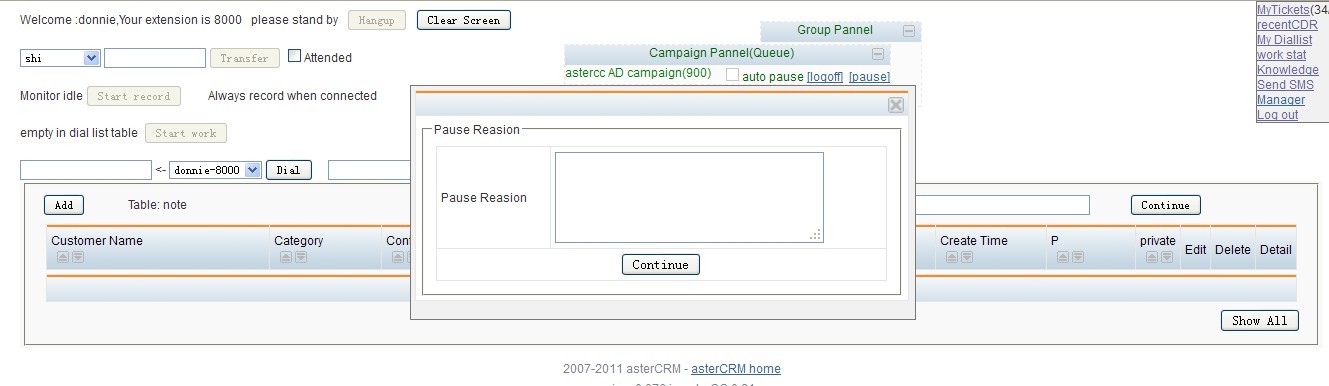
Log in the system page, enter the agent interface. Find the campaign pannel(Queue ) below the campaign corresponding to the queue number, and the two options, login, pause.

After elected “login”, then the current agent has been logged into the queue which belongs to the queue number, the queue was according to the state of all the agent be logged to assign the calls. After elected “pause”, then the agent has been logged are not be assigned phone calls whether he is busy or free. When elected logoff, the current agent were logged off  from the queue, the queue will not assign any phone calls to the agent.

Return to the management interface, enter the dial list below campaign find the queue number corresponding to the campaign name, click on the campaign “edit” to open.

Find queue number, indicate the agent to be logged in the queue number; Queue Context, the crew used the queue context, freePBX use the latest version is the current from-queue; Use Extension Channel For Queue, where there are two cases. One case is logged in default, do not be checked before “Use Extension Channel For Queue”, in the asterisk CLI to perform queue show.

Another case is to use” Use Extension Channel For Queue”, checked before “Use Extension Channel For Queue”, in the asterisk CLI to perform queue show.

Back to the management interface, enter the extension to find the user name of current agent, click “edit”

Channel option, sip/8003, 8003 is the current agent extension.

A Sonicwell Product · Also: CXMind AI · WCC Contact Center