All Posts By

solo@astercc.org

import data in asterCC

By | asterBilling, asterCRM | No Comments

You can import your data via web page in asterCC, in asterCRM, you can import customers, contacts and diallist, in asterBilling, you can import customerrate, grouprate and resellerrate, when import in asterCC, it will require you define how to map your data in excel/csv file to fileds in database.

say you have a rate table what to import as rate for callshop, filename is callshoprate.csv, the content is like

93,0,Afghanistan,0,1,14.5,60,1,2,15.03.08 18:22
9370,0,Afghanistan - Cellular,0,1,11,60,1,2,15.03.08 18:22
9379,0,Afghanistan - Cellular,0,1,11,60,1,2,15.03.08 18:22
35538,0,Albania - Cellular,0,1,10.5638,60,1,2,15.03.08 18:22

1. select your data file, asterCC support excel or csv format OR you can select a exsited file in your “upload” folderand then click “Upload”

then select callshoprate from the drop down menu on left

If this rate is for specific reseller/group, we can selec the reseller and group at the buttom, but here we leave is as “All”, means all groups in all reseller will use this rate by default

click “Import” to import the data, then u might get a Success prompt and see such page

if you only get 0 records from the message, go back and check if anything is wrong.

In astercrm, there’re some more options

why we say asterCC solutions could work with all kinds of asterisk based solution.

By | asterBilling, asterCRM, asterisk | No Comments

asterCC package provides a call center solution and a billing solution for asterisk, the most important feature is, asterCC could work with all asterisk based solutions and no need do any modification to the original system,  as we have tested, including:

  • Trixbox
  • Elastix
  • Callweaver
  • Freepbx
  • Magiclink
  • Fonesoft
  • asterisk2billing (a2b)
  • pbx in a flash

so when you are using a asterisk based system and want to add call center or billing features, asterCC is a good choice.

asterCC solutions connect to your asterisk via AMI over tcp, so even a embedded asterisk equipment would use asterCC for billing or contact center.

asterCC works based callerid, so it doesnt care what’s the asterisk dialplan or how a agi work, as long as you have  correct callerid in your asterisk, asterCC could work with it.

Working as daemon service in linux, asterCC is stable and extremely efficient, we have test that it could support at least 240 simultanieous asterisk calls.

Open source as all web scripts is, there’s also the possibility that you make your own solution based astercc daemons, and with the 5 free simultanieous channel license it provides by default, no need to pay a dollar for small business, like to bill an asterisk pbx with users less than 12.

How to set asterBilling working with Freepbx, Trixbox, Elastix …

By | asterBilling | 21 Comments

asterBilling is a realtime billing solution for asterisk, could be used as a hosted callshop or just a simple billing system for your asterisk pbx. Many people are using freepbx based system as their pbx, like trixbox, elastix … so here i’ll introduce you how to use asterBilling to bill your asterisk pbx.

the first thing is, you must have freepbx installed and have a user their, say you want to bill these two users: solo <8000> and donnie <8001>

next go to asterBilling manager login (like https://asterccserver/asterbilling/manager_login.php) and login as “admin”

Although we only want to bill our pbx,  still have to add a reseller first, go to “reseller” and click “Add” button, pur some message in the form and click “continue”

i left “Credit Lmit” to be null and “Limit Type” to “No limt” coz i just want to know how much each phone dialed each month.

then go to “Account Group” and add a group there

Read More

using astercc and asterrc daemon to bill your asterisk

By | asterBilling | 2 Comments

asterrc is a billing script in asterCC package, together with astercc, asterrc could provide you the realtime billing feature to your asterisk system.

there’re some billing fields in table ‘curcdr’, they are

`credit` : credit by customer rate (rates in table ‘myrate’)
`callshopcredit`: credit by callshop (rates in table ‘callshoprate’)
`resellercredit`: credit by reseller (rates in table ‘resellerrate’)
`creditlimit`: if we have a creditlimit for this call, if it has once the ‘credit’ reach the number, the call would be hang up
`destination` : destination of the call, get from table ‘myrate’
`memo` : rate of the call, get from table ‘myrate’

asterrc daemon will maintain these fields during a live call, and we have same fields in table mycdr, so when a call is finished, we can also get the credit of the call.

Also, we have billing fields in table ‘clid’, ‘accountgroup’,’resellergroup’

`curcredit` current credit (works as a billing flag)
`credit_clid` total clid credit for the item
`credit_group` total group credit for the item
`credit_reseller` total reseller credit for the item

Here’s a example to show you how asterrc works

say we have defined a rate, we sell to reseller in 0.1 a minute, reseller sell to callshop in 0.2 a minute, and callshop sell 0.4 a minute to customer, when customer start a call, astercc will get the live CDR into table curcdr, and asterrc will put value 0.4, 0.2, 0.1 to fields ‘credit’, ‘callshopcredit’, ‘resellercredit’ when it’s the first minute, and then 0.8, 0.4, 0.2 when it’s the second minute …. when it’s 2 minutes and a half, customer hangup the call, then we get a record with billing message 1.2 in ‘credit’,  0.6 in ‘callshopcredit’, 0.3 in ‘resellercredit’, meantime fields in clid, accountgroup and resellergroup would be updated, credit_clid = credit_clid + 1.2, credit_group = credit_group + 0.6, credit_reseller = credit_reseller + 0.3.

field ‘curcredit’ is used to save credit for comparing with creditlimt, it is updated after a call is finished, if limit type is set and curcredit is greater or equal with the creditlimit, the call would be hangup, when clid/group/reseller charges, we set curcredit = curcredit – {fund charged} so that curcredit is less than creditlimit and calls can go out.
Say a reseller pay you 500 euro, and u set his limit type to prepaid, and creditlimit = 500, then it is curcredit = 0, limittype= prepaid, creditlimit = 500 in table resellergroup, then booths under this reseller start to call ,  curcredit will increase by resellerrate, when it reachs 500, all calls stoped, reseller comes to you and charge 2000 euro, here you have two options

1. set credit limit to 500+2000 = 2500, but not recommend, coz there’d no log for changing of creditlimit

2. charge 2000 to curcredit, then curcredit = 500-2000 = -1500,  and this operation would be logged in credithistory, so that you can check the charge history of each customer.

Hope this could help you under stand how asterbilling works.

how to update asterCC license for your asterisk

By | asterBilling, asterCRM | 12 Comments

By default, astercc providers you 5 free simultaneous channels license, you can purchase more if need.

First, edit /opt/asterisk/scripts/astercc/astercc.conf which is in same folder with astercc daemons, go to section [licence], you can find three parameters there

[licence]
licenceto =
key =     (no this parameter in current version now)
channel = 5

change “channel” to the number of simultaneous channels you need, and “licence to” to the name of your organization, so now it looks like

[licence]
licenceto = my organization
key =
channel = 50

save and exit,  then execute astercc script, you should get things like

[dev01 astercc]# /opt/asterisk/scripts/astercc/astercc
Invalid key, please contact the administrator
identity = b0a5ebca13556ca9ca91813dd88dfgd9

now send this identitykey and all content in licence section (licenceto and channel) to astercc, we’ll send you back the licence key, then update your astercc.conf with the licence key, restart astercc & asterrc daemons. If no error message output, your astercc support more simultaneous channels now.

for the latest version, we start to use a license file named ‘license.astercc'(64 bits), so after u get the license file, upload it to the same folder with your astercc daemons, usually it’s in

/opt/asterisk/scripts/astercc/

then restart astercc daemons

/opt/asterisk/scripts/astercc/asterccd stop

/opt/asterisk/scripts/astercc/asterccd start

if everything is fine, it should give no errors, then the channels now in astercc is the value you put after channel =  in /opt/asterisk/scripts/astercc/astercc.conf

and use this command you can check if the license will expire some day

/opt/asterisk/scripts/astercc/astercc -h

0000-00-00 means never expire

and astercrm and asterbilling will share same license file, which means when you get the license, you can either use it for astercrm or asterbilling or both.

good luck!

History about asterCC, asterCRM and asterBilling

By | asterBilling, asterCRM | One Comment

In July, 2007, we start a project, the aim is to provide a call center system for asterisk, which should be all web based and no rely on dialplan, also should have some simple CRM features. That’s how asterCRM came, we made it all open source and free to use so that it could grow faster. On 2007-08-08, we released the first version, 0.01beta, then 0.01, 0.03, 0.04 … it upgraded almost every month. At the same time, we’d like to provide a realtime billing solution for asterisk, then we made tow daemons running in linux, astercc and asterrc, astercc could catch live CDR from asterisk and asterrc could bill based rate and destination. We found this billing solution is perfect for hosted callshop, then we released asterCC on 2008-3-5, asterCC means the core of the system is the astercc daemon. After asterCC released, we found that we could get a much better performance and much more features if we use astercc damon in asterCRM, then we start integrate astercc daemon into asterCRM, then we released 0.0461 and 0.047beta, so that asterCRM could work based astercc daemon smoothly. So for now, both the billing solution and the call center solution need astercc daemon, then we decide rename them and package both into one software, we use asterCC as the package name, asterCRM as call center solution as it was, and use asterBilling as the software for realtime billing. asterCC ——asterCRM ——asterBilling asterCRM and asterBilling are both open source software, but the point is that you have to purchase license to get more simultaneous channels support in astercc daemon, by default it provide 5 free license so you can experience how asterCRM and asterBilling works.

add language package for asterCRM & asterBilling

By | asterBilling, asterCRM | 2 Comments

For now asterCRM provides user two languages, English and Simplified Chinese, if you want to add a new language, follow this article you can make it yourself.

say you want to add German to astercrm, first go to astercrm/login.php and find the following lines:

<OPTION value=”en_US”>English</OPTION>
<OPTION value=”cn_ZH”>简体中文</OPTION>

we use de_GER for German so we add line then it looks like

<OPTION value=”en_US”>English</OPTION>
<OPTION value=”cn_ZH”>简体中文</OPTION>
<OPTION value=”de_GER”>Germany</OPTION>

save the file, then when you enter astercrm login page, you can see

select Germany and login, and we go to next to change words.

asterCRM language files locate in astercrm/include/language, where you can see files like

account_cn_ZH.php
account_en_US.php
portal_cn_ZH.php
portal_en_US.php

so cn_ZH means Simplified Chinese, for Germany one, you can copy account_cn_ZH.php as account_de_GER.php, copy portal_cn_ZH.php as portal_de_GER.php

dont copy from en_US file coz for some words we have English as default in pages, so it could be not integral in the language file, en_US files could be used as reference.

then open the copied file account_de_GER.php with some text editor, and start translate, so it looks like

<?
$add_account = “Ein neues Benutzerkonto wurde hinzugefügt”;
$update_rec = “Eintrag wurde aktualisiert”;

?>

save the file with format UTF-8 when you finish.

translate one by one …, not much but need some patient untill all finish.

The last thing, change all images, go to astercrm/skin/default, you can see folders like “images_cn”, “images_en”.. copy images_en as images_de then modify all images in the folder.

refresh your browser then you can see asterCRM with your translation!

add google map for your customer in asterCRM

By | asterCRM | 2 Comments

asterCRM support goolge map, so you can add a map for your customer using this feature.

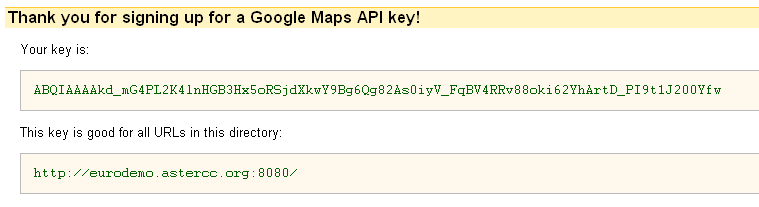
1. you need to apply a google api key

go to https://code.google.com/apis/maps/index.html

click “Sign up for a Google Maps API key.” on right

click the check box and enter your web site URL then button “Generate API Key”

done! now you get the key for Google Maps API

Read More

features in astercctools for asterisk

By | asterBilling, asterCRM | No Comments

astercctools is a daemon script provided in asterCC package, it has two features for now( version 0.01-081116): 1 get sip peer status astercctools will connect to your asterisk via AMI and execute command “sip show peers” then parse the result to table `sip_show_peers` in your mysql database. 2 get queue status astercctools will also execute command “show queue” then parse the result to mysql tables, it would put the result to table `queue_stats`,`queue_name`,`queue_agent`,`queue_caller` using astercctools in your asterisk application, you can read sip and queue status from mysql instead of connecting to asterisk each client seperately, so this would increace efficiency and stability. Read More

scripts in asterCC

By | asterBilling, asterCRM | 3 Comments

The scripts folder in asterCC package, it provides you several scripts, so here is what are they:

  • astercc: the main daemon script in asterCC, it would run as a daemon when add “-d” parameter (astercc -d), astercc will connect to your asterisk via AMI, and catch all call events and put them into mysql database in realtime, so only astercc is running, all other functions would work.
  • asterrc: a billing daemon, it would load rates to memory and when there’re new calls it would analyze the CDR based callerid and destnation then put the rate into database in realtime. It support three level billing, reseller, group, and customer. You need asterrc running when you want to bill your asterisk.
  • astercclock: astercclock is used for billing as well, when there is no credit for customer/group/reseller/single call/callback it would cut the call, also if a callerid is blocked, the would also be hangup.
  • astercctools: astercctools will put some useful data to database, like sip status and queue status

so you need astercc and astercctools running when it’s a call center application, and need astercc, asterrc, astercclock when it’s a billing application. In scripts directory, it also provide you some tools to control daemons above

  • asterccd: start, stop or check astercc status(you can edit it to assign which daemon could be controled)
  • asterccdaemon: a watch dog shell, put it to your cron job list so it would start astercc daemons when they dies(if it start by asterccd,then which daemon could be checked by it is same as which daemon could be controled by asterccd)
A Sonicwell Product · Also: CXMind AI · WCC Contact Center