new feature in asterbilling

By | asterBilling | No Comments

we provide a new feature in asterbilling, you can read your buy rate when add a sell rate manually.

say admin set three rates for reseller:
default     0.2        for all resellers
0086        0.25     for reseller1
00852     0.3        for all resellers

new_feature_rate_hint_1

then reseller1 logged in and want to add sell rate for his callshop

1. we add rate for North Americe, which prefix is 001, it will give the buy rate for 001 after input box (we didnt set prefix 001 in rate to reseller, so it will use default rate)

new_feature_rate_hint_2

2. we add rate for China, which prefix is 0086, it will give the buy rate for 0086 after input box

new_feature_rate_hint_3

3. we add rate for HK, which prefix is 00852, it will give the buy rate for 00852after input box

new_feature_rate_hint_4

also, when groupadmin add customer sell rate, he can also see his buy rate from reseller
new_feature_rate_hint_4

add callshop & realtime billing feature to your a2billing

By | asterBilling | 2 Comments

If you have a a2billing working already, you may want to add some more features, like make it work as a hosted callshop, here we’ll introduce how to add callshop feature using asterbilling.

  • add a new conf in your a2billing add a new conf like [agi-conf2] in a2billing.conf, make sure you have the changed the following options: ; Manage the answer on the call answer_call = NO play_audio = NO use_dnid = YES number_try = 1 say_balance_after_auth = NO say_balance_after_call = NO say_rateinitial = NO say_timetocall = NO cid_enable = NO cid_auto_assign_card_to_cid = NO anyway, disable all prompt & announcement
  • add new dialplan in asterisk extensions by default, sip peer generated by a2billing will use context a2billing, so we add [a2billing] ; for asterbilling booth exten => _X.,1,DeadAGI,a2billing.php|2
  • sc-2
  • add costomer in a2billing then we add a customer in a2billing, make sure you enabled sip or iax account, then click the “generate” button and click “reload” link also u may want to set this customer as “postpay” and a big number for the limit coz you would not charge customer in a2billing, just make sure this customer could make calls with no problem
  • set your ip phone go to “List Sip-friend” or “List iax-friend” get the username/secret for your phone, then try make a call, if everything goes well, u should make a call successfully
  • sc-4
  • add clid in asterbilling go to asterbilling and create clid using the username(if there’s callerid defined for this customers, use callerid instead) in sip-friends
  • sc-1
  • login as groupadmin/operator and enjoy 🙂
  • sc-3

why cant import when the file is big?

By | asterBilling, asterCRM | 2 Comments

some customers find that they get a problem when import, it just gives a XML error, that’s because there’s too much data and no enough memory for php. find the php.ini for your apache line: memory_limit it could be like 16M or 20M, try change it bigger, say 64M so it looks like memory_limit = 64M save and exit, remember restart your apache before give the try.

We released asterCC-BOX 0.1 ISO

By | Latest News | 17 Comments

Dowload asterCC-BOX-0.1

asterCC-BOX includes CentOS linux, it’s an easy to install contact center and billing system, based on asterisk PBX and asterCC software package, inegrated FreePBX(asterisk web GUI) with simplified chinese language package and asternic-stats(analyze your Asterisk PBX queue_log). asterCC-BOX provides flexible and stable phone system, contact center and billing(callshop solution) system for your business.

astercc-box-bootastercc-box-grub

astercc-box-web

freepbx_en

asternic-stats

dialer, queue and popup for asterisk callcenter(freepbx,trixbox,elastix,pbxinflash) with asterCRM

By | asterCRM | 16 Comments

The latest asterCRM has a great improvement in dialer, and with asterCRM, it’s quite easy to build a call center. Here’s a how-to for a outbound call center with Freepbx and astercrm. Following by this how-to, you can creat such a solution:

asterCRM dialer will call the numbers in your diallist, and when the call is connected, it would be redirect to a queue, where your agent will answer the call and talk the customers,  they can do survey , sales or whatever you want.

* freepbx is a web gui for asterisk which is widely used in asterisk applications, like trixbox, elastix, pbx in flash …

  • install freepbx

For freepbx installation, you can read the installation document from freepbx website https://www.freepbx.org. If you are using trixbox, elastix or pbx in flash, then u can skip this, it have freepbx build in already.

  • install asterCRM, make sure asterCRM daemons (astercc and astercctools) are running

for asterCRM installation, go and check asterCRM wiki:

https://wiki.astercrm.org/index.php/AsterCRM_Installation#Using_the_install_script

  • add extensions for your agents and set a queue to receive calls from asterCRM dialer

login into freepbx, start add extensions for your agent

freepbx-add-extension

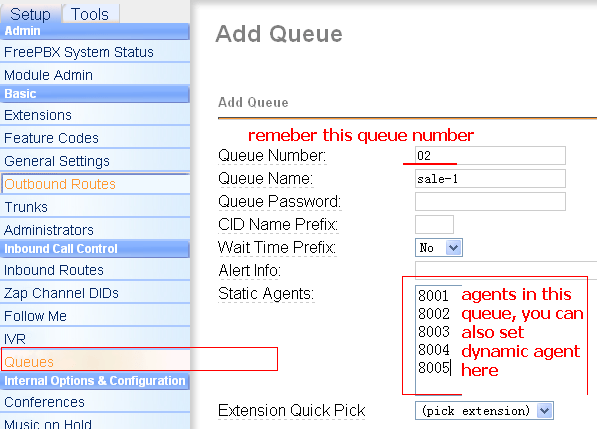
then add a queue

freepbx-queue

  • set group/user in asterCRM

next login asterCRM as admin, create group “outbound sales” and add extensions for agents you created above, go wiki for more detail

https://wiki.astercrm.org/index.php/Create_Group

https://wiki.astercrm.org/index.php/Create_Extension

make sure “Extension” matched “Outbound CID”  or “Extension”(if outbound cid is blank) in freepbx

so now all your agents should get a username/password for asterCRM.

Read More

Why I cant see some records in CDR page in my asterBilling?

By | asterBilling | 3 Comments

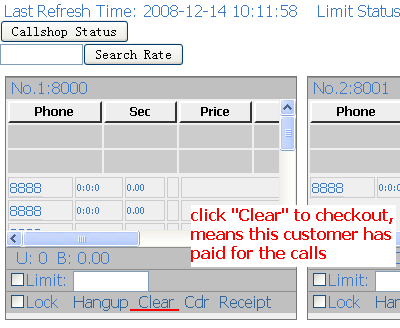
sometimes when you go CDR page to check CDRs for resellers, groups or some clid in your system, but nothing there or some records missed, and then u go database and checked, find there’s data in cdr table “mycdr”, so why it’s missed in asterBilling interface? Reason 1: historyCdr issue check your asterbilling.conf.php in asterbilling web scripts folder sc1 by default the option is “useHistoryCdr = 1”, and asterbilling CDR page will go table “historycdr” to fetch data, but astercc daemon only put data to table “mycdr” untill someone “checkout” the records, the data will be moved to table “historycdr”, so if u cant find all data in web interface, change this option to “0” or “checkout” the records. click Clear to checkout Reason 2: clid issue Even though the astercc daemon will put all CDR it get to database, but not all records will be billed, only after you set the “clid” in asterbilling. So if u see the value of fields “resellerid” and “groupid” in “mycdr” is -1, please check if u set the “clid” correctly, the “src” field should be matched with clid. sc3

Survey features in asterCRM for outbound call center usage

By | asterCRM | No Comments

In asterCRM, it provides a survey features, so you can set survey for your customers, here will give you a simple introducation for this:

first you need to add a survey, login as admin/group admin go manager interface and click survey icon, click “Add” button for a new survey, you can add several options for one survey, and each survey it provides three kinds: radio, checkbox and text

survey-1

survey-2

Click the “item” link next to the option to enter items for this option

survey-3

keep putting options and items until u finish this survey.

Then you can  put a survey from the agent page

survey-4

survey-5

*when there’s a customer or contact in your record form, if u click the “Add” link of a survey, the result will be linked with the customer

Click the “Detail” link of a survey, u can get a statistic of this survey

survey-6

asterisk channels

By | asterisk | 6 Comments

astercc daemons are licensed by asterisk simultaneous channels, so how could we know the channel’s number of the asterisk server? outbount: 1 call, 1 channel callback: 1 call, 2 channels queue: 1 call, 2 channels but if you select the ring strategy as “Ring All”, then u may get tons of channels when a call come in. also when you goes to voicemail or login as dynamic agent, it will take one channel.

adjust astercc parameters to get better performance for asterisk billing

By | asterBilling, asterCRM | No Comments

There’re some parameters in file astercc.conf for astercc daemons. We can change them to get a beter performance for asterisk billing. please note that u need to restart asterrc daemon to reload configration. refreshrate = 60 refreshrate is the seconds asterrc daemon reload data from database, when u change asterBilling setting a lot, like rate, clid … , u need this parameter, but once your system is stable, u can set it to -1, so that after asterrc load the data when it start, it would not read from database again and again. refreshlock = 30 The seconds we refresh data for astercclock to lock booth, or lock group, reseller. calculateallcdr = no when set to yes, asterrc will re-calculate all records with groupid =-1 or resellerid = -1 in mycdr table, this could be used when u want to calculate the CDRs with no billing . calculateoldcdr = no when set to yes, asterrc will re-calculate all records in mycdr table, this could be used when u want to calculate the history CDR. This could be used when your rate changed and you want to reset all credits. callbackbill = src ; src: bill src only ; dst: bill dst only ; both: both src and dst removeNonSysCDR = 0 ; if we need use asterrc to remove CDR with resellerid = -1 or groupid = -1 removeNoAnswerCDR = 0 ; if we need use asterrc to remove no answer CDR

asterbilling and asterisk2billing (a2billing) for asterisk billing

By | asterBilling | One Comment

a2billing is a widly used billing system, so what’s the difference between a2billing and asterbilling?

system theory:

a2billing work with asterisk through AGI, each call would be handled by a2billing.agi, so you need change your astierks context so that when your phone make calls it will go to a2billing.agi, of course you need to copy a2billing scripts to your asterisk server.

asterbilling runs as linux daemons, connect to asterisk via AMI over tcp,  no need change anything on your asterisk, asterbilling can bill it. Even asterbilling could work with a2billing.

license & free:

a2billing: 100% open source and free to use.

asterbilling: only web scripts are open source, and provides 5 free simultaneous channels, have to purchase when need more channels.

performance:

a2billing: like 100 simultaneous calls on single server? i didnt test, 🙁

asterbilling: passed 240 simultaneous calls testing, but didnt test more.

best usage:

a2billing: calling card, callback or wholesale solutions

asterbilling: billing for embedded astiersk, pbx (like all freepbx based system), callshop, hosted callshop soltution

other keywords:

a2billing: openser

asterbilling: realtime billing, reseller

A Sonicwell Product · Also: CXMind AI · WCC Contact Center