

The latest asterCRM has a great improvement in dialer, and with asterCRM, it’s quite easy to build a call center. Here’s a how-to for a outbound call center with Freepbx and astercrm. Following by this how-to, you can creat such a solution:
asterCRM dialer will call the numbers in your diallist, and when the call is connected, it would be redirect to a queue, where your agent will answer the call and talk the customers, they can do survey , sales or whatever you want.
* freepbx is a web gui for asterisk which is widely used in asterisk applications, like trixbox, elastix, pbx in flash …
- install freepbx
For freepbx installation, you can read the installation document from freepbx website https://www.freepbx.org. If you are using trixbox, elastix or pbx in flash, then u can skip this, it have freepbx build in already.
- install asterCRM, make sure asterCRM daemons (astercc and astercctools) are running
for asterCRM installation, go and check asterCRM wiki:
https://wiki.astercrm.org/index.php/AsterCRM_Installation#Using_the_install_script
- add extensions for your agents and set a queue to receive calls from asterCRM dialer
login into freepbx, start add extensions for your agent

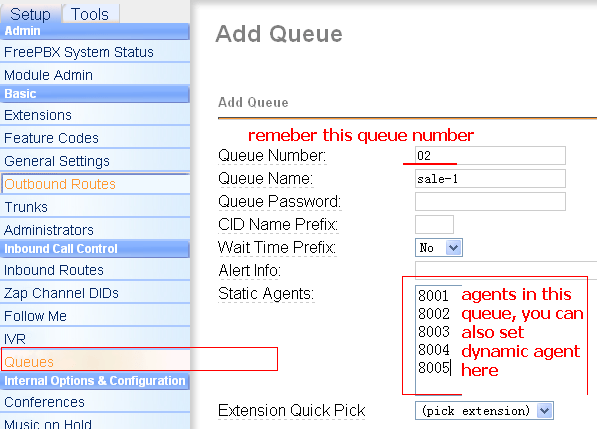
then add a queue
- set group/user in asterCRM
next login asterCRM as admin, create group “outbound sales” and add extensions for agents you created above, go wiki for more detail
https://wiki.astercrm.org/index.php/Create_Group
https://wiki.astercrm.org/index.php/Create_Extension
make sure “Extension” matched “Outbound CID” or “Extension”(if outbound cid is blank) in freepbx
so now all your agents should get a username/password for asterCRM.
- set a campaign

put the queue number “02” in and check the “bind” checkbox, then as soon as customer answer the call, it would be putted into the queue, and your agent could start talk!
https://wiki.astercrm.org/index.php/Create_Campaign
- import diallist
say you have already get 1000 numbers you want agents make call to, then use import function to import these number to diallist for this campaign
https://astercc.org/tips/2008/11/import-data-in-astercc.html
- agents login
your agent should get ready to start! Log into astercrm and log into the queue if they are dynamic agent.

- start dialer
both groupadmin and admin could start the dialer, go management interface and then click “Dialer” icon

check the checkbox “start”, it will start dial, u can set limit by channel or limit by agent in the queue, in the latest version, it would not stop dial even u close the page, but will stop if u uncheck the checkbox “start”.
https://wiki.astercrm.org/index.php/Predictive_dialer
- agents login
when a customer is connected and redirect to the agent in queue, it would popup customer information if you have in database

hi,
i’ve installed asterisk 1.4.22 and astercc-0.13 beta.my all deamons are started perfectly. i’ve added campaign group and the related agents. but when i check the dialer of astercrm then it shows AMI_connection_failed..
i’ve done a lot of efforts but all in vain.
plz anybody help me!!!
hi
did u config your astercrm.conf.php ?
hi,
thanks for the reply sir.
yes i’ve configured my astercrm.conf.php file.
i’ve checked the four files which are related with the connection parameters. these are:
1)astercrm.conf.php
2)eventsdeamon.pl
3)manager.conf
4)astercc.conf
all the files have the same connection parameter. but still i’ve got AMI_connection_failed when i click on the dialer tab in astercrm.
the one more problem is that when i login into the astercrm as admin-admin the first page is portal.php page. on this page the following buttons are not active:
1)start record
2)hangup
3)start work
plz help me regarding this problem.
if u need i’ll send the snapshots of the files further.
thanks.
one more thing sir should i install freepbx.Is it required?
thanks.
not a must
did u enable AMI in /etc/asterisk/manager.conf ?
hi,
yes sir i’ve enabled that.i’ve done all the configurations that is required to make a call from astercrm…
i’ve enabled AMI in /etc/asterisk/manager.conf file and i’ve ensured it by doing netstat on the terminal and it give the 5038 port listening…
one more thing when i enter a number in the dial list to dial a number at a specific time then it astercrm dial that number internally and it will not generated a pop-up tp dispaly that call and no call is actually setup. so please help me…..i’ve blocked on this from last 5 days.
thanks.
how u config the context for inbound/outbound, you can send your access to solo at sonicwell dot com, so i can check for u if need
i’ll try to send the link for the zipped files of all those configuration files.
thanks.
hi,
these are the links for all the main files related with asterisk and astercrm.
http://rapidshare.com/files/380300811/manager.zip.html
http://rapidshare.com/files/380301765/astercc.zip.html
http://rapidshare.com/files/380301968/astercrm.zip.html
http://rapidshare.com/files/380302142/eventsdeamon.pl.zip.html
http://rapidshare.com/files/380302449/extensions.zip.html
please chk all these and give me the way to solve my problem.
thanks.
hi,
i’m waitng for your reply.
plz send me the solution as early as possible.
i’ll be thankfull for this.
thanks,
your astercrm.conf.php
please save as unix format
hi,
i’m again sending the link for astercrm.conf.php
http://rapidshare.com/files/381096125/astercrm.conf.php.zip.html
thanks.
edit this file in linux you will find it is like
port = 5038 username = sachin secret = sachin
so please make sure it’s linux format not windows
and can u post on http://forums.astercc.org, i dont like rapidshare
hi,
thanks for the reply.
i’m not able to post the configration file on http://forums.astercc.org, because i don’t know how to register in forums.astercc.org.
i’m sending the rapidshare link for the complete edited file. might be this will be easy to read for u.
http://rapidshare.com/files/381114539/astercrm.conf.php.zip1.html
sorry i’m again sending the file on rapidshare.please check it now. i’ll be thankful to you.
and also tell me how to login on forums.astercc.org…please so that i can post my future problems on this
thanks.
http://forums.astercc.org/ucp.php?mode=register&sid=672472f2fc14fdb4f83ef2926ef22cb9
this file seems fine, doesnt work?