Tag

Asterisk Archives - Page 2 of 3 - Call Center Software Solution Provider | AsterCC

tutorial: use astercrm & asterisk for broadcasting

By | asterCRM | 6 Comments

in this tutorial, it will guide u how to broadcast your message in asterisk and astercrm.

1. add outbound context in asterisk

add the following content in your dialplan (like extensions.conf)

[for-outbound] exten => _X.,1,Dial(SIP/yourtrunk/${EXTEN},45)
exten => _X.,n,Hangup

exten => h,1,NoOp(${DIALSTATUS})
exten => h,n,Hangup

here  “yourtrunk” should be defined in your sip conf file, or you can use other trunk you have, like IAX2, ZAP, DAHD I…

2. add inbound context in asterisk

add the following content in your dialplan (like extensions.conf)

[for-collection] exten => _X.,1,NoOp(${EXTEN})
exten => _X.,Background(YOURMESSAGE)
exten => _X.,n,Hangup

exten => 1,1,Queue(1000); means when customer press 1 when it’s playing, he will reach your queue 1000

exten => h,1,Hangup()

then it will look like

context

3. add group in astercrm

login astercrm as admin, then go to extension->group admin, add a group for this broadcasting project

group

4. add campaign in astercrm

then go to diallist->campaign, add a campaign, in outcontext and incontext, we will put the context we added before, for-outbound and for-collection

campaign

5. upload the diallist

you can upload a excel/cvs file to diallist, or you can insert record to diallist table using your script

numbers.csv

numbers

import:

import

6. start the dialer

then u can go to dialer page to enable the campaign,  also you can set a limitation of  the max outbound calls there

dialer

7. set a time limitation

if you only want it dial at spcific time, you can add a time package for the campaign. first add some time

diallist -> worktime

worktime

then create a work time package and add the worktime in

worktime_package

then set the campaign to use this work time package

campaign_with_worktime

8. check dial result

go to diallist -> dialedlist, you can find the result

dialedlist

hope this post can help you create ur first broadcasting campaign, and u can also improve on this, like u can use a script to insert to diallist automaticly or set some survey so customer can press in their option when listening to your message.

building a virtual office using astercrm ,freepbx and asterisk

By | asterCRM | 6 Comments

In a virtual office, you will have few receiption but they can answer calls for hundred company, in such case, they should know which number customer dialed so that they dont mess up the calls, now we introduce u how to build a virtual call center using astercrm & asterisk.

1. add extension for receiption

open your browser and go to freepbx, click extension on left menu and add extensions for your receiption, here we have three extensions: 8000, 8001 and 8888

freepbx_extensions

2.  add a queue for your receiptions which would be used to answer incoming calls, we only add 8000 and 8001 in this queue

freepbx_queue

and u can set some options for this reciption queue

freepbx_queue_detail

3. add a trunk which could be used for incoming calls

freepbx_trunk

and the most important, set registry for this trunk so that u can get calls in

freepbx_trunk_1

4. add a inbound route so that the receiption queue could answer your incoming calls

freepbx_inbount_route

now make a call to your DID number, if everything is allright, phones of receiption should ring

5. go to astercrm and add account for your receiptions

astercrm_account

6. add trunkinfo so your receiption could get some information about the number customer dialed

astercrm_trunk_info

here Trunk Channel should be the username of your trunk, not trunk name in freepbx

7. login as a receiption accound and try make a call

astercrm_agent_1

when ringing

astercrm_agent_2

when talking

this tutorial could be used on trixbox, elastix or any other system using freepbx, also u can config receiption account and dialplan by your self.

add callshop & realtime billing feature to your a2billing

By | asterBilling | 2 Comments

If you have a a2billing working already, you may want to add some more features, like make it work as a hosted callshop, here we’ll introduce how to add callshop feature using asterbilling.

  • add a new conf in your a2billing add a new conf like [agi-conf2] in a2billing.conf, make sure you have the changed the following options: ; Manage the answer on the call answer_call = NO play_audio = NO use_dnid = YES number_try = 1 say_balance_after_auth = NO say_balance_after_call = NO say_rateinitial = NO say_timetocall = NO cid_enable = NO cid_auto_assign_card_to_cid = NO anyway, disable all prompt & announcement
  • add new dialplan in asterisk extensions by default, sip peer generated by a2billing will use context a2billing, so we add [a2billing] ; for asterbilling booth exten => _X.,1,DeadAGI,a2billing.php|2
  • sc-2
  • add costomer in a2billing then we add a customer in a2billing, make sure you enabled sip or iax account, then click the “generate” button and click “reload” link also u may want to set this customer as “postpay” and a big number for the limit coz you would not charge customer in a2billing, just make sure this customer could make calls with no problem
  • set your ip phone go to “List Sip-friend” or “List iax-friend” get the username/secret for your phone, then try make a call, if everything goes well, u should make a call successfully
  • sc-4
  • add clid in asterbilling go to asterbilling and create clid using the username(if there’s callerid defined for this customers, use callerid instead) in sip-friends
  • sc-1
  • login as groupadmin/operator and enjoy 🙂
  • sc-3

dialer, queue and popup for asterisk callcenter(freepbx,trixbox,elastix,pbxinflash) with asterCRM

By | asterCRM | 16 Comments

The latest asterCRM has a great improvement in dialer, and with asterCRM, it’s quite easy to build a call center. Here’s a how-to for a outbound call center with Freepbx and astercrm. Following by this how-to, you can creat such a solution:

asterCRM dialer will call the numbers in your diallist, and when the call is connected, it would be redirect to a queue, where your agent will answer the call and talk the customers,  they can do survey , sales or whatever you want.

* freepbx is a web gui for asterisk which is widely used in asterisk applications, like trixbox, elastix, pbx in flash …

  • install freepbx

For freepbx installation, you can read the installation document from freepbx website https://www.freepbx.org. If you are using trixbox, elastix or pbx in flash, then u can skip this, it have freepbx build in already.

  • install asterCRM, make sure asterCRM daemons (astercc and astercctools) are running

for asterCRM installation, go and check asterCRM wiki:

https://wiki.astercrm.org/index.php/AsterCRM_Installation#Using_the_install_script

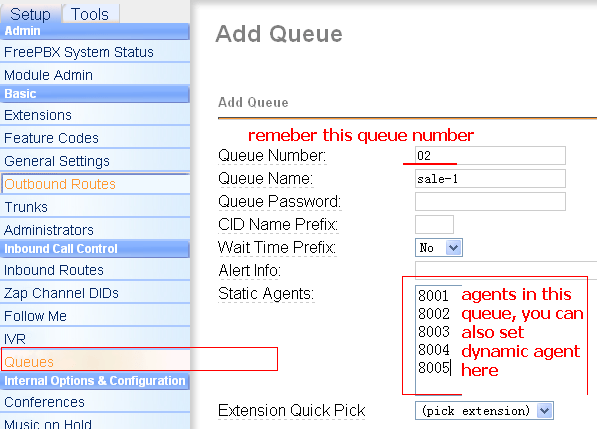
  • add extensions for your agents and set a queue to receive calls from asterCRM dialer

login into freepbx, start add extensions for your agent

freepbx-add-extension

then add a queue

freepbx-queue

  • set group/user in asterCRM

next login asterCRM as admin, create group “outbound sales” and add extensions for agents you created above, go wiki for more detail

https://wiki.astercrm.org/index.php/Create_Group

https://wiki.astercrm.org/index.php/Create_Extension

make sure “Extension” matched “Outbound CID”  or “Extension”(if outbound cid is blank) in freepbx

so now all your agents should get a username/password for asterCRM.

Read More

Survey features in asterCRM for outbound call center usage

By | asterCRM | No Comments

In asterCRM, it provides a survey features, so you can set survey for your customers, here will give you a simple introducation for this:

first you need to add a survey, login as admin/group admin go manager interface and click survey icon, click “Add” button for a new survey, you can add several options for one survey, and each survey it provides three kinds: radio, checkbox and text

survey-1

survey-2

Click the “item” link next to the option to enter items for this option

survey-3

keep putting options and items until u finish this survey.

Then you can  put a survey from the agent page

survey-4

survey-5

*when there’s a customer or contact in your record form, if u click the “Add” link of a survey, the result will be linked with the customer

Click the “Detail” link of a survey, u can get a statistic of this survey

survey-6

asterisk channels

By | asterisk | 6 Comments

astercc daemons are licensed by asterisk simultaneous channels, so how could we know the channel’s number of the asterisk server? outbount: 1 call, 1 channel callback: 1 call, 2 channels queue: 1 call, 2 channels but if you select the ring strategy as “Ring All”, then u may get tons of channels when a call come in. also when you goes to voicemail or login as dynamic agent, it will take one channel.

adjust astercc parameters to get better performance for asterisk billing

By | asterBilling, asterCRM | No Comments

There’re some parameters in file astercc.conf for astercc daemons. We can change them to get a beter performance for asterisk billing. please note that u need to restart asterrc daemon to reload configration. refreshrate = 60 refreshrate is the seconds asterrc daemon reload data from database, when u change asterBilling setting a lot, like rate, clid … , u need this parameter, but once your system is stable, u can set it to -1, so that after asterrc load the data when it start, it would not read from database again and again. refreshlock = 30 The seconds we refresh data for astercclock to lock booth, or lock group, reseller. calculateallcdr = no when set to yes, asterrc will re-calculate all records with groupid =-1 or resellerid = -1 in mycdr table, this could be used when u want to calculate the CDRs with no billing . calculateoldcdr = no when set to yes, asterrc will re-calculate all records in mycdr table, this could be used when u want to calculate the history CDR. This could be used when your rate changed and you want to reset all credits. callbackbill = src ; src: bill src only ; dst: bill dst only ; both: both src and dst removeNonSysCDR = 0 ; if we need use asterrc to remove CDR with resellerid = -1 or groupid = -1 removeNoAnswerCDR = 0 ; if we need use asterrc to remove no answer CDR

Rates setting in asterbilling for asterisk billing

By | asterBilling | 3 Comments

There are three rates in asterBilling, reseller rate, callshop rate and customer rate.

  • reseller rate: the rate admin sell to reseller
  • callshop rate (group rate): the rate reseller sell to callshop (group)
  • customer rate: the rate callshop sell to customers

Rates in asterBilling could be inherited, for example, here’s two records in resellerrate

dialpreifx = 0086
number length = 0
connect charge = 0.2
init block = 60
rate = 0.2
billing block = 60
resellerid = 0

dialpreifx = 0049
number length = 0
connect charge = 0.4
init block = 60
rate = 0.4
billing block = 60
resellerid = 0

Because we dont specify which reseller is this rate for (resellerid = 0), this rate could be used for all resellers.  So what if some resellers want to change this rate rather than use this “default” rate? quite simple, just add another rate for the reseller:

dialpreifx = 0086
number length = 0
connect charge = 0.2
init block = 60
rate = 0.2
billing block = 60
resellerid = 1

so for this reseller (resellerid=1), when customer dial a number begin with 0086, it will use this new rate, we  can call it “overwrite”, but for other resellers who dont set their rate, it would use the one admin setted.

Just like reseller rate, group rate could also be inherited.

A:
dialpreifx = 0086
number length = 0
connect charge = 0.2
init block = 60
rate = 0.2
billing block = 60
resellerid = 1
grouprid = 1

B:


dialpreifx = 0086
number length = 0
connect charge = 0.4
init block = 60
rate = 0.4
billing block = 60
resellerid = 1
grouprid = 0

C:

dialpreifx = 0086
number length = 0
connect charge = 0.4
init block = 60
rate = 0.4
billing block = 60
resellerid = 0
groupid = 0

so rate C is a rate for all reseller and all group,  rate B is for all groups in reseller 1, rate A is only for group 1.

Through inherit rate, admin could be much easier to control the rates, like just set one rate for all resellers, and adjust some when they require some difference, also reseller could just set one rate for his callshops, and only do minor change to provide different rate plan.

asterbilling hosted callshop solution for asterisk

By | asterBilling | 22 Comments

asterBilling is a realtime billing software for asterisk. Through asterBilling, it’s very easy to build a hosted callshop solution for asterisk. benefits of asterBilling hosted callshop solution:

  • reseller, callshop, customer three level billing
  • all web based
  • high performance
  • all asterisk system compatible

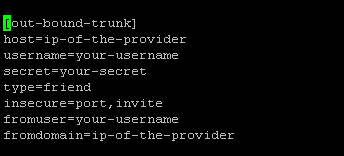
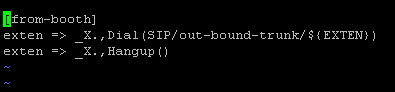
here, i’ll introduce u how to build a hosted callshop solution using asterisk and asterbilling. 1. step1, install asterisk 2. step2, set trunk and dialplan in asterisk edit /etc/asterisk/sip.conf and add your trunk there then set dialplan, go to /etc/asterisk/extensions.conf and add a context there 3. step3, install asterBilling 4. step4, check asterbilling.conf.php We need to modify asterbilling config file to meet our system, so check the “asterbilling.conf.php” in asterbilling folder, find section “sipbuddy” change context to be “context = from-booth”, so the sip peer generated by asterbilling will use context “from-booth” for outbound calls. * if you are using freepbx, you can use “context=from-internal” here, then it you can set outbound in your freepbx and all booth will use that. By default, asterbilling will generate all sip peers to the file “/etc/asterisk/sip_astercc”, you can change to other name if you want, or leave it blank if u dont want asterbilling generate the sip peers also we need to include the conf file in sip.conf so that asterisk could load peers asterbilling generated modify /etc/asterisk/sip.conf and add #include sip_astercc.conf 5. step5, set resellers and groups 6. step6, add clid as reseller reseller 7. step7, set rates asterbilling provides three level billing: rate to reseller: the rate you sell to resellers rate to callshop: the rate resellers sell to callshops rate to customer: the rate callshops sell to customers 8. step8, login as groupadmin/operate check callshop interface callshop 9. step9, check reports

A Sonicwell Product · Also: CXMind AI · WCC Contact Center