Monthly Archives

December 2008

dialer, queue and popup for asterisk callcenter(freepbx,trixbox,elastix,pbxinflash) with asterCRM

By | asterCRM | 16 Comments

The latest asterCRM has a great improvement in dialer, and with asterCRM, it’s quite easy to build a call center. Here’s a how-to for a outbound call center with Freepbx and astercrm. Following by this how-to, you can creat such a solution:

asterCRM dialer will call the numbers in your diallist, and when the call is connected, it would be redirect to a queue, where your agent will answer the call and talk the customers,  they can do survey , sales or whatever you want.

* freepbx is a web gui for asterisk which is widely used in asterisk applications, like trixbox, elastix, pbx in flash …

  • install freepbx

For freepbx installation, you can read the installation document from freepbx website https://www.freepbx.org. If you are using trixbox, elastix or pbx in flash, then u can skip this, it have freepbx build in already.

  • install asterCRM, make sure asterCRM daemons (astercc and astercctools) are running

for asterCRM installation, go and check asterCRM wiki:

https://wiki.astercrm.org/index.php/AsterCRM_Installation#Using_the_install_script

  • add extensions for your agents and set a queue to receive calls from asterCRM dialer

login into freepbx, start add extensions for your agent

freepbx-add-extension

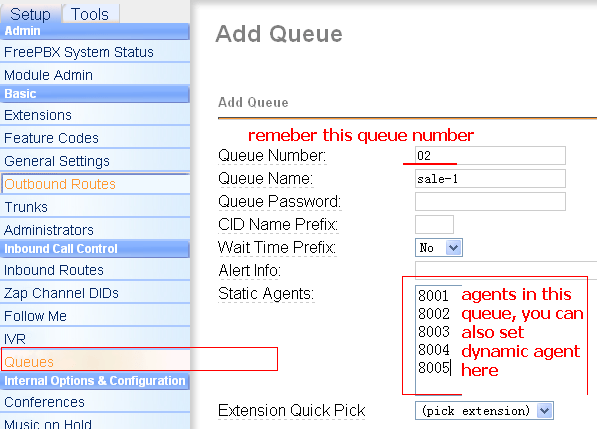
then add a queue

freepbx-queue

  • set group/user in asterCRM

next login asterCRM as admin, create group “outbound sales” and add extensions for agents you created above, go wiki for more detail

https://wiki.astercrm.org/index.php/Create_Group

https://wiki.astercrm.org/index.php/Create_Extension

make sure “Extension” matched “Outbound CID”  or “Extension”(if outbound cid is blank) in freepbx

so now all your agents should get a username/password for asterCRM.

Read More

Why I cant see some records in CDR page in my asterBilling?

By | asterBilling | 3 Comments

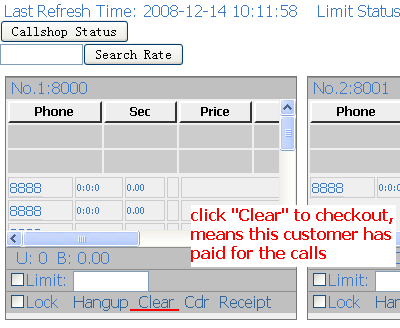
sometimes when you go CDR page to check CDRs for resellers, groups or some clid in your system, but nothing there or some records missed, and then u go database and checked, find there’s data in cdr table “mycdr”, so why it’s missed in asterBilling interface? Reason 1: historyCdr issue check your asterbilling.conf.php in asterbilling web scripts folder sc1 by default the option is “useHistoryCdr = 1”, and asterbilling CDR page will go table “historycdr” to fetch data, but astercc daemon only put data to table “mycdr” untill someone “checkout” the records, the data will be moved to table “historycdr”, so if u cant find all data in web interface, change this option to “0” or “checkout” the records. click Clear to checkout Reason 2: clid issue Even though the astercc daemon will put all CDR it get to database, but not all records will be billed, only after you set the “clid” in asterbilling. So if u see the value of fields “resellerid” and “groupid” in “mycdr” is -1, please check if u set the “clid” correctly, the “src” field should be matched with clid. sc3

Survey features in asterCRM for outbound call center usage

By | asterCRM | No Comments

In asterCRM, it provides a survey features, so you can set survey for your customers, here will give you a simple introducation for this:

first you need to add a survey, login as admin/group admin go manager interface and click survey icon, click “Add” button for a new survey, you can add several options for one survey, and each survey it provides three kinds: radio, checkbox and text

survey-1

survey-2

Click the “item” link next to the option to enter items for this option

survey-3

keep putting options and items until u finish this survey.

Then you can  put a survey from the agent page

survey-4

survey-5

*when there’s a customer or contact in your record form, if u click the “Add” link of a survey, the result will be linked with the customer

Click the “Detail” link of a survey, u can get a statistic of this survey

survey-6

A Sonicwell Product · Also: CXMind AI · WCC Contact Center