

Into the system management interface, find the import function,enter.
 Choose file
Choose file to upload, you can browse the files you want, or you can choose an existing file, then upload it. After successful upload, the data you want will upload to the system, then you can select the form, specify the data into the appropriate form.

Select customer, there will be corresponding to the fields of this form.
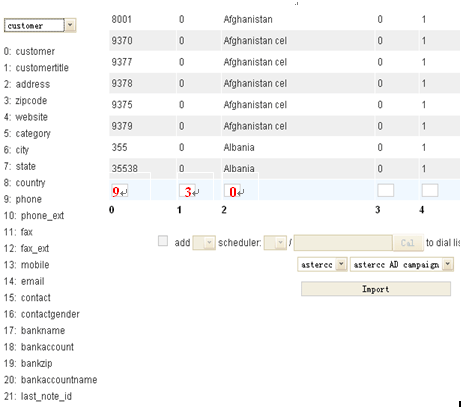
According to the data appear in front of several pieces of information, each vertical line corresponding to one information, information corresponding to the field appears to the left and the fields of the code will fill in the information at the bottom of the box.

Next, you must tick before “add” , and the data adding to the dial list at the same time, select the number corresponding to the phone, select the outbound time, if you want to be evenly distributed to agent, then you do not tick before “assign”, if you want a agent assigned to a designated, tick in front of the “assign”, and noted the number of the agent, if you want to assign two or three agent you can with “,” separated. Choose your campaign, and click Import.
Before importing, when you make the phone number that will be imported to assign to a designated agent, then after importing is completely, return to the agent interface, you will find all the phone numbers waiting to be dialed in the dial list.

If you do not want to assign these phone number to a designated agent, you do not have to tick before “assign”, return to the agent interface, you will find there is not any date in the dial list from agent interface.

then all date have been imported will be found in dial list, the system do not assign to any agent.

dial list
Then you go back to “customer” page, you will find all the data has been imported successful in your customer data sheets, and all information corresponding to each field in form. At the same time, dial list also appear to all the same data has been imported, according to the dialing time to go to dial the number.