Category

Latest News

asterCC Call Center released 1.2.2

By | Latest News | No Comments

asterCC Commercial released a new version 1.2.2, old user could go to system modules to upgrade the main changes include

  • auto send report via email
  • you can define a url to popup in campaign
  • support customer calendar
  • add call transfer/consult popup
  • support BLF
  • added several new parameters in IVR
  • allow reset assgined agent when recycle customer numbers in a campaign
  • add order status in agent popup interface

For download, please go to https://astercc.org/downloads change log:

core-1.2.2

  • Add link field for the customize field

cutomize_link

  • The memo contains wrap,can not open the qcpage
  • Change the “Hour” to “hh:mm:ss” in the graph statistics

statistic_h_m_s

  • Optimize the error message
  • Add the yellow color tip to show the username,role and the localtime

System tip on the right top

  • Add main customer canlendar,customer oriented,when the customer changed,the canlendar will be assigned to the agent
  • Add the “My Workorder” page priviledge in the role,it used to show the agent’s workorder for agent

role_myworkorder

workportal_myworkorder
  • When consulting or transfer,the consulted or transfered agent will popup the customer informatioin page,so the consulted or transefered agent can click the `Immediately Refresh` to refresh the customer information
  • Fixed the outside device can not transfer to extension
  • Add phone BLF function
  • Fixed the export file can not export correctly fields
  • Fixed the search box’s css incorrectly
  • When export,can fill in the emails.So,the export file will mail to the emails.Include this page:
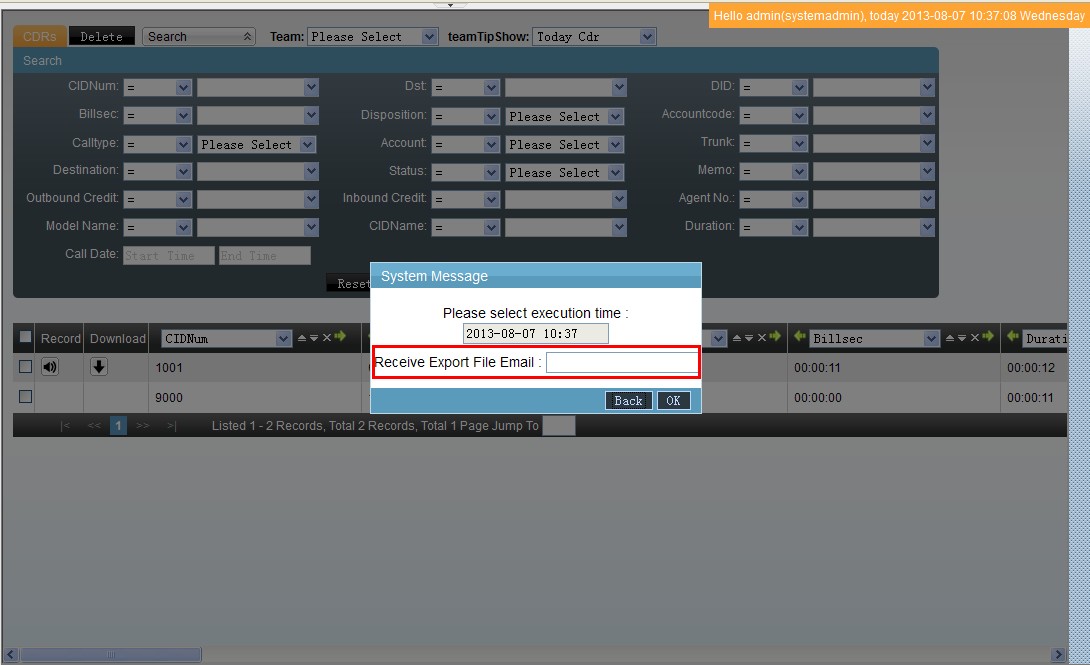
export_set

  • PBX → CDRS
  • Campaign → Customer Packages’ page to click the `Export Customers` on the edit page
  • Campaign → Customers
  • Campaign → CDRs
  • Campaign → Quality Control
  • Dialer → Campaign Diallists
  • Customer Service → CDR
  • Customer Service → Miss Calls
  • Survey → Survey’s page,click `Quotation` button to open the quotation page to export the quotation
  • Account
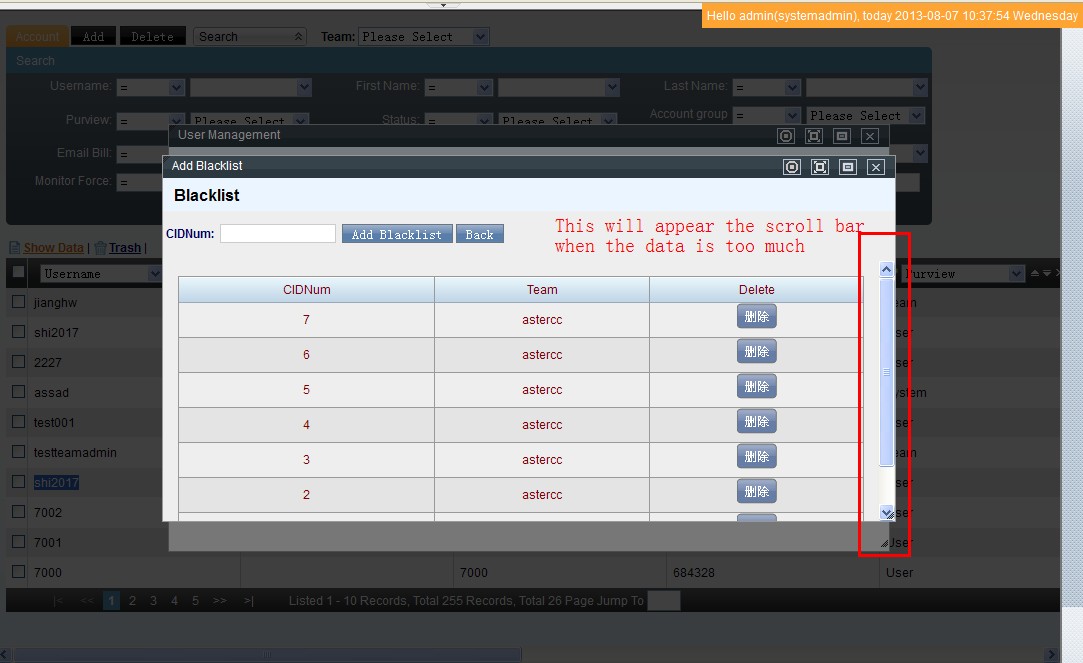
    • On the add blacklist or whitelist page,the scroll bar will appear when the data is too much

scroll

  • Agent
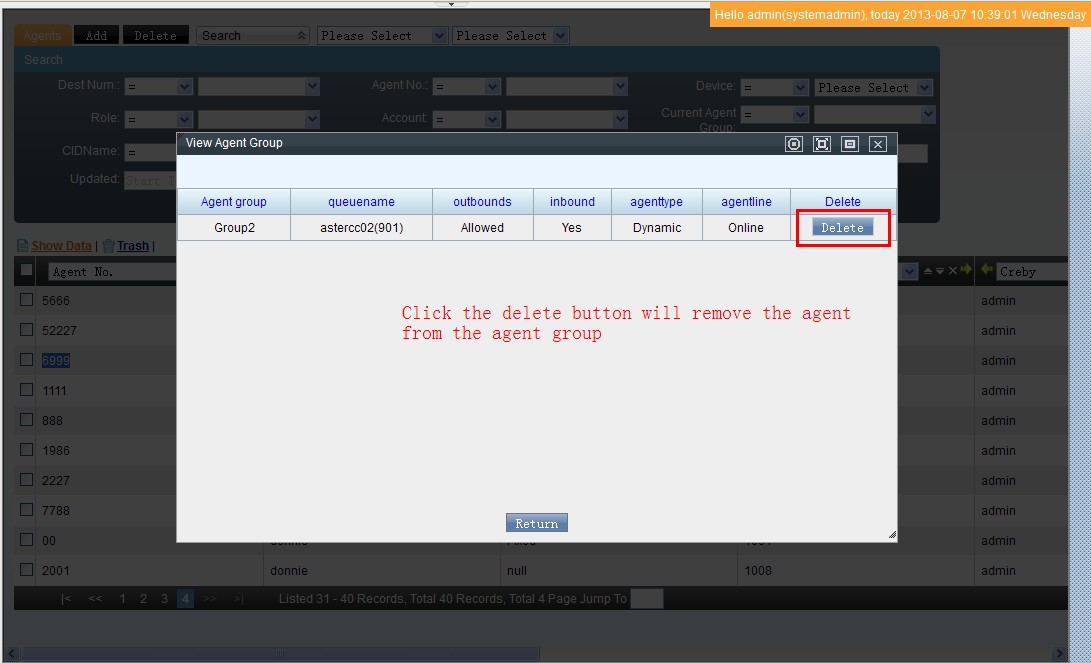
    • Click the `View Agent Group` button to open the page,can remove the agent from the agent group

remove_agent

  • Agent Group
    • Edit the `ACW` Fields will get one tip message “Editor Successful Please remind the agent to relogin”
  • Customization
    • wrap unite to the unix standard
    • the `Display As` field can be edit
  • Trunk
    • Edit `Registry String` field will appear the reload tip
  • Outbound Routes
    • Add `Sip Refer` to `Transfer` field in the outbound route rule

sip_refer

  • IVRs
    • Fixed can save the empty data
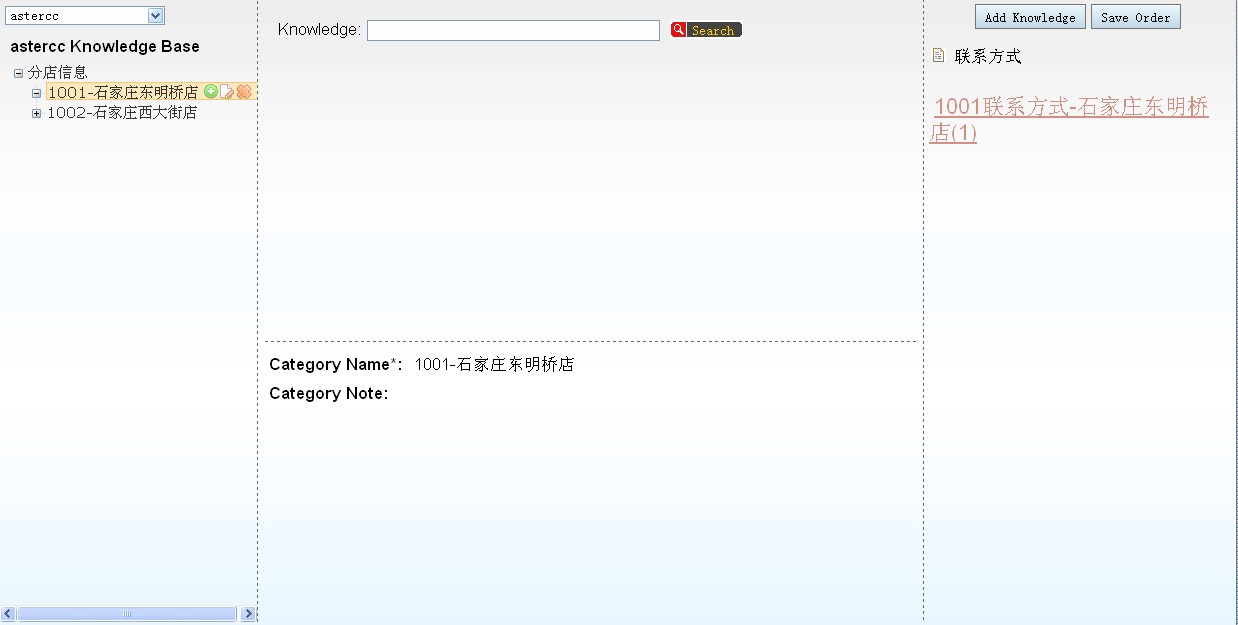
  • Knowledge
    • Revise some po
    • Optimize the css
  • Device
    • The `ExteralNumber` can not be the same with `Ext. No.`
  • Setting
    • Add sip tcp parameter to `GENERAL SIP SETTINGS`,include `tcpenable`,`tcpbindaddr` and `transport`.
  • Backup Archives
    • Optimize the page pagination css
  • Live Trunk
    • Fixed can not show the trunk which no team belongs to
  • BLF Group
    • Can set the device to join the BLF Group,so the device can see the status of other device in the group by the phone machine

Login Page

  • Fixed can not press the enter key to enter to the system,when finish to fill in the email
  • Access the login page by the team identity,support two patterns
    • 1.https://asterccSERVERip/teamIdentity
    • 2.Use the domain bind to the astercc Server
      • https://www.teamIdentity.xxx
      • https://teamIdentity.xxx
      • Access the login by use the team identity,will no longer to show the team select.This will be suitable for multi-team operations
      • Login the astercc Server, vi /etc/astercc.conf
      • Add under [system]
      • login_route = team
      • If exists `;login_route = team`,please remove the `;`

Campaign

  • The campaign which use main table customer can use the dialer to work

Dialer

  • When recycle,need to use `Schedule` field’s value in the customer information as the dialer’s `Schedule`.There are two case:
    • The cycle customer’s `Schedule` field is not empty,and it behind the recycle operate’s `Schedule`
    • The cycle operation doesn’t set the `Schedule`,and the cycle customer’s `Schedule` is not empty
  • Can use one option to control whether to truncate the customer’s agentno

reset_agent

  • Campaign Diallist
    • Disable the edit function of the customer in the list under the `Campaign Customer`

Agent Work Page

  • Add `status` to show in the order list when view the purchase records

add_status_show

  • The scroll bar will appear when the queue is too much to suitable the screen
  • Fixed can not get the pedding customer data under the `Pending` Tag on the campaign work page

asterCC IP PBX & Call Center released 1.2

By | Latest News | No Comments

The main changes include

  • a new module E-Commerce
  • Improve the main table, now campaign and customer service moduel could share same customer information
  • Agent could have individual caller id
  • Added caller id rules
  • Improved data import features
  • Added auto-pause feature for agent
  • Support multi-phone number when use auto dialer mode, and background hint
  • Support search and merge customer, now one customer could have more than one number

Related Post:

https://wiki.astercc.com/doku.php?id=en:how-to:how_to_config_customer_service_module_for_inbound_calls

https://wiki.astercc.com/doku.php?id=en:how-to:how_to_config_e-commerce_in_a_campaign

For changlog, please go to

https://wiki.astercc.com/doku.php?id=en:change_log:astercc-1.2_changelog

asterCC hosted IP PBX & Call Center system released 1.2-beta

By | Latest News | No Comments

Today asterCC released a new version: asterCC 1.2-beta, in this version, it uses a new http push moduel, more stable than the previous one. The other improvement is that it comes with two new modules: customer service and work order Besides, the license mode has big changes, it now gives 60 days trail with all modules and 5 agents, you can apply for longer time or more agents for test if need. You can download from https://astercc.org/downloads Related posts:

asterCC passed a 60 hours inbound queue testing with 60 online agents

By | Latest News | No Comments

As customer requires, we did a inbound testing with asterCC call center, the environment is agent: PC + softphone (63 online agents max.) server: Dell PowerEdge 2950 ( E5405 x 1, 4G ) PBX + CTI + Recording Dell PowerEdge R710 ( E5405 x 1, 4G ) PHP + MySql testing start: 4pm, 25th,Jan,2013 testing end: 9am,28th,Jan,2013 Metho: create 100 agents and set them in one queue, use DID inbound route to make the calls go to the queue, and keep the simultaneous call numbers to be 100. test result: 63 agents at the beginning, when it’s done, 58 agents online,5 agents quit due to system halted at PC, another 3 agents has softphone issue test conclusion: asterCC call center passed the test, for agents, customer could consider use IP Phone or gateway to instead of softphone.

Eaka chain hotel 400 customer service contact goes online

By | Latest News | No Comments

Shijiazhuang Guoda Group has 3 chain hotel brands—Eaka 365, Gogo inn, and Tony inn, and the hotel number of these 3 brands is estimated to reach 200 in 3 years. To better serve the guests, the group decided to employ astercc call center system.

The 400 call center requires 24-hour service, high quality of voice and fax. Therefore, sangoma E1 card with echo cancel has been chosen for the hardware side.

After a month’s system customization and test, the system was put online on December, 6, 2012.

The system realized the following functions,

  • IVR and point inquiries via IVR
    • Customers are able to choose service types, self-service inquiry, human service or voice mail according to IVR menu.
    • Customers can inquire their reward points through IVR (integrated with 啊3rd party reservation system).
  • Inbound popups
    • When customers call 400 numbers and choose human service, a page contains customer information (integrated with reservation system), and rechargeable card information would pops up.
    • When the customer has the intention to book a room, the agent can directly switch to the reservation system and finish the booking.
  • Customer Callback
    • Each hotel picks guests randomly and the agents call them back for feedbacks, using astercc telephone inquiring system.
  • Missed calls callback
    • When customers choose human service and eventually give up wait because the agent is busy handling other things, agents can call back or create a ticket via the missed call list in the system.
  • Ticket
    • Admin creates three tickets flow: consultation, complain, customer care, system pre-defined the ticket flow, it would stay in ticket queue waiting assignment automatically or manually.
  • Knowledge base
    • We added permission assignment to the knowledge base, and new knowledge submitted by agents can be published after being approved by team leaders.
  • Integrated SMS
    • The system is integrated to a 3rd party SMS system, so agents can simple click the preset SMS template (like hotel address etc) to customers.
  • Integrated FAX
    • The system has fax interface, and can fax the PDF reservation order generated by the reservation system to the hotel.

asterCC commercial tele-marketing call center users reached 1000 online agents

By | Latest News | No Comments

As the 60-agents project in Shijiazhuang, 200-agents in Wuhu, as well as the 75-agents project in Shanghai launched one after another recently, the total agent number has reached 1000 of asterCC tele-marketing by August 28, 2012. Promisingly, this number may possibly exceed 2000 by the end of this year.


Since the asterCC tele-marketing system released in 2010, with a long term of adjusting and improving according to customer demands, we are now stepping into a harvest time. Flexible networking, multiple functions, intelligent predictive dialer and stable system are the answers to the recent explosive increase of our customers. We are now expecting the upcoming market share as the sales and after-sales service network is extending rapidly. Apart from consolidating the advantages in outbound field, we are now gradually increasing the input in inbound projects as we released the advanced statement module, so as to achieve more integrated inbound call center service for more enterprises.

Here, we sincerely invite you to join us, as agents or sales, and to make this industry even better.

asterCC released 0.22-beta

By | Latest News | No Comments

asterCC recently released it’s OS product: asterCC 0.22-beta, the most change in this version is that it uses nginx+php-fpm to replace the old apache+php for http service. This change brings a better performance. Change Log:

  • fixed the file path bug when using force_record
  • fixed the bug when dialer campaign is working under time condition
  • make it faster when loading rates
  • fixed the bug when astercctools parse queue log with -i

Download URL:

A Sonicwell Product · Also: CXMind AI · WCC Contact Center